Health Insurance Sales Copilot (USA)
Picture this: you're a health insurance seller, and mid-call with a hot prospect. The conversation is flowing: you're building rapport, zeroing in on the right benefits to pitch and sensing the deal is close. Then they ask a specific question: “Coverage for a pre-existing condition”; “An out-of-pocket limit”; “A network exclusion”. To answer it, you'd need to hunt through one of a thousand policy documents, scan the right clause and come back with a confident, accurate response, all while keeping the prospect engaged and the momentum alive. Every second of silence costs you credibility. Every wrong answer costs you the deal. That's the gap AI Health Insurance Sales Copilot was built to close.
AI Health Insurance Sales Copilot is an AI-powered solution that acts as a real-time companion for health insurance sellers in the USA, enabling them to respond to policy queries, summarize and compare policies and deliver personalized, high-quality sales pitches. By instantly surfacing policy insights and automating structured comparisons, it enhances seller productivity, reduces manual effort and ensures consistent, effective customer interactions.
The solution acts as a real-time digital copilot during customer interactions, enabling sellers to:
-
Answer policy questions confidently
-
Compare between policy benefits with clarity
-
Summarize policy nuances instantly
-
Deliver tailored, persona-based sales pitches
The objective of building this agentic solution is to
-
Ramp up onboarding time for new health insurance sellers
-
Assist sellers with key information during a customer conversation
-
Improve seller productivity and responsiveness
-
Reduce time spent manually reviewing policy documents
Capabilities
In this AI solution, the “AI Sales Copilot Agent” serves as an intelligent Health Insurance Sales Copilot trained on a knowledge base consisting of 100s of health insurance policy documents. It retrieves and recommends insurance policies based on state-specific availability and guidelines.
The workflow begins with the seller selecting a state, after which the Copilot surfaces the relevant policies available in that state. Using this contextual information, the agent can:
-
Summarize benefits from a particular health insurance policy for the selected state.
-
Create or refine a sales pitch the agent can confidently use during a customer conversation.
-
Compare benefits from two or more policies to identify the best fit for the customer.
-
Instantly respond to customer policy-related queries by retrieving accurate and contextual answers from the knowledge base
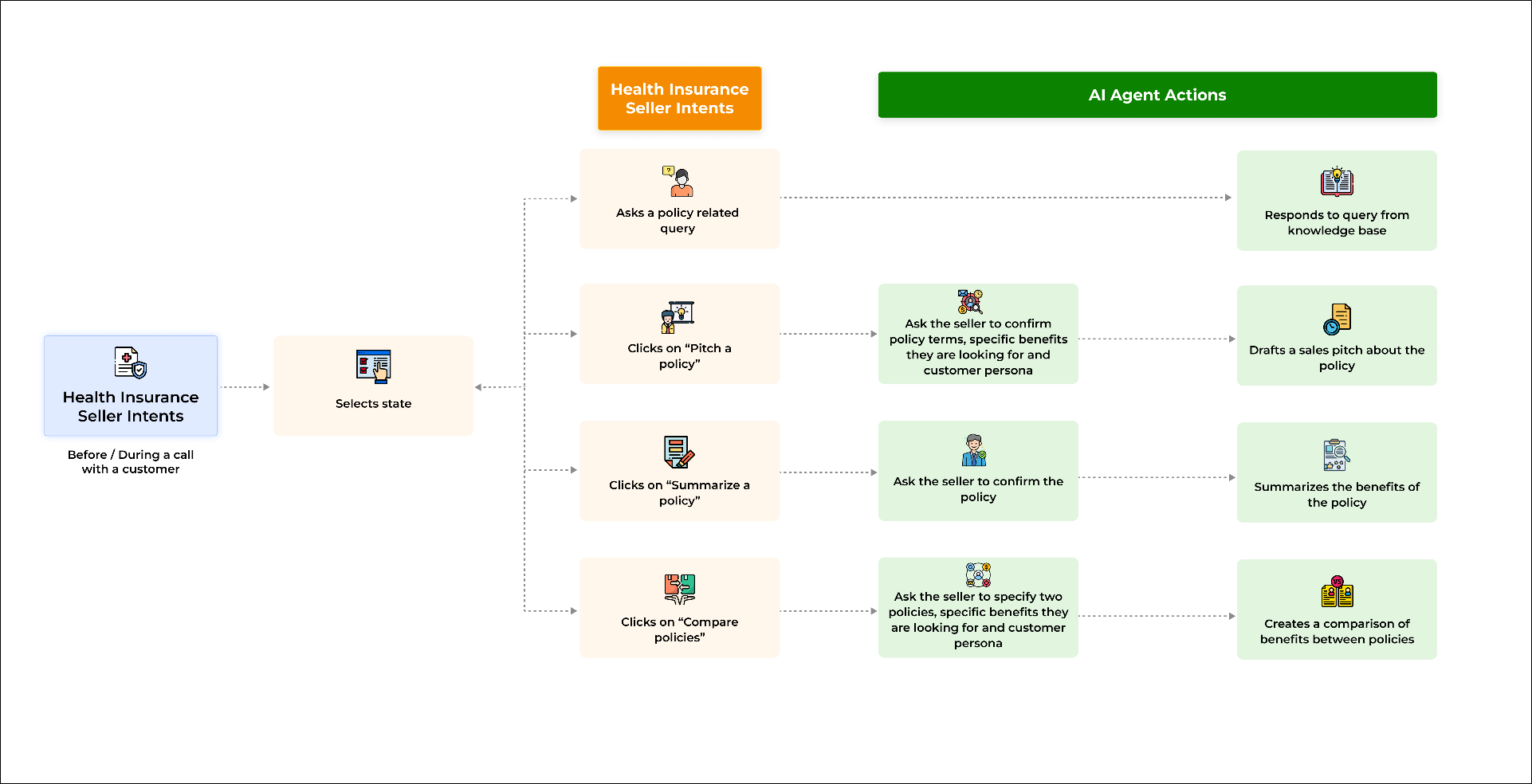
Fig. A snapshot of the Copilot workflow.
Copilot in Action
This section demonstrates the AI Health Insurance Sales Copilot Solution from the perspective of a health insurance seller. The insurance seller uses Copilot when a customer calls or when they are pitching a policy. In the demo environment below, the AI agent has been trained on 6 insurance policies across 2 states to keep the experience simple and focused..
Step: Select a State
When the insurance agent launches the Copilot, the screen displays a welcome message and prompts the agent to select a state.
The agent selects a state and clicks Confirm.
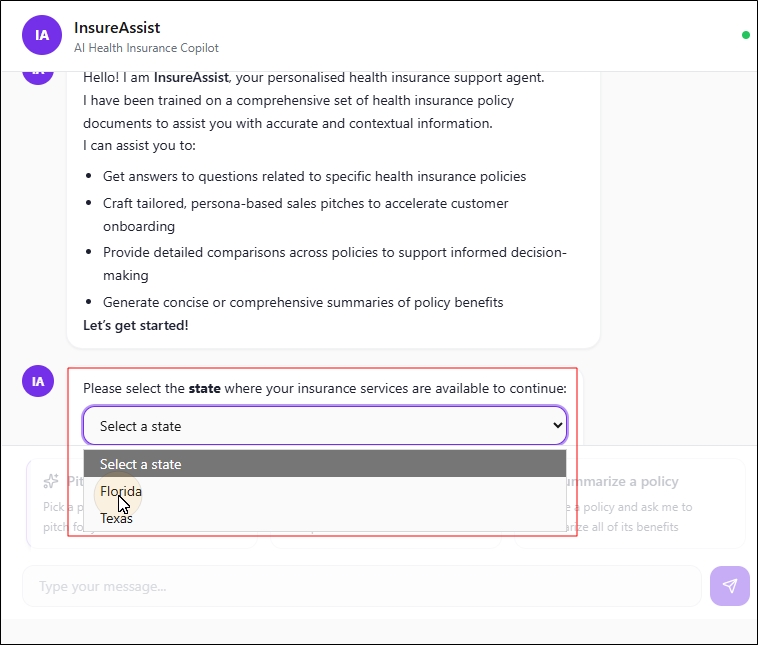
Fig. A snapshot of the Select a State dropdown.
Once a state is selected, all available policies relevant in the selected state are shown to the health insurance seller. The health insurance seller is also shown options to:
-
Pitch a policy
-
Compare policies
-
Summarize a policy
For any other query, the insurance seller can type their query in the chat box.
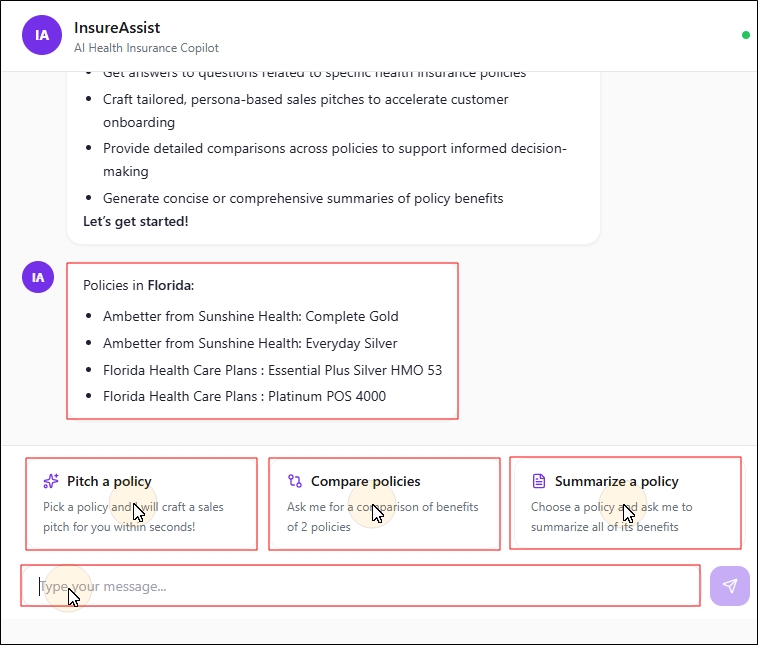
Fig. A snapshot of the policies available in the selected state.
Use-case 1 : Pitch a Policy
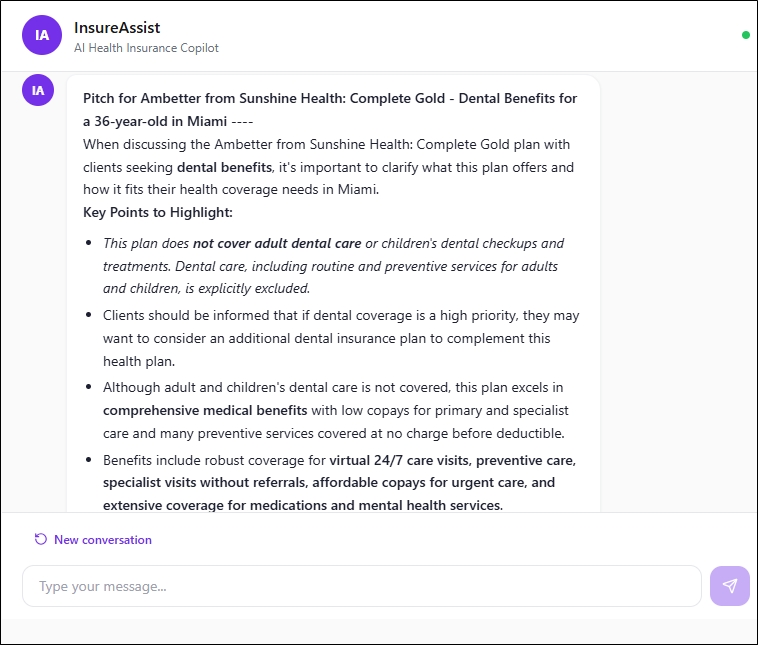
Clicking on this option/ prompt would result in the AI Sales Copilot agent draft a sales pitch in seconds.
-
Click Pick a Policy.
-
Select a policy from the Select a policy for your pitch dropdown.
-
Click Confirm.
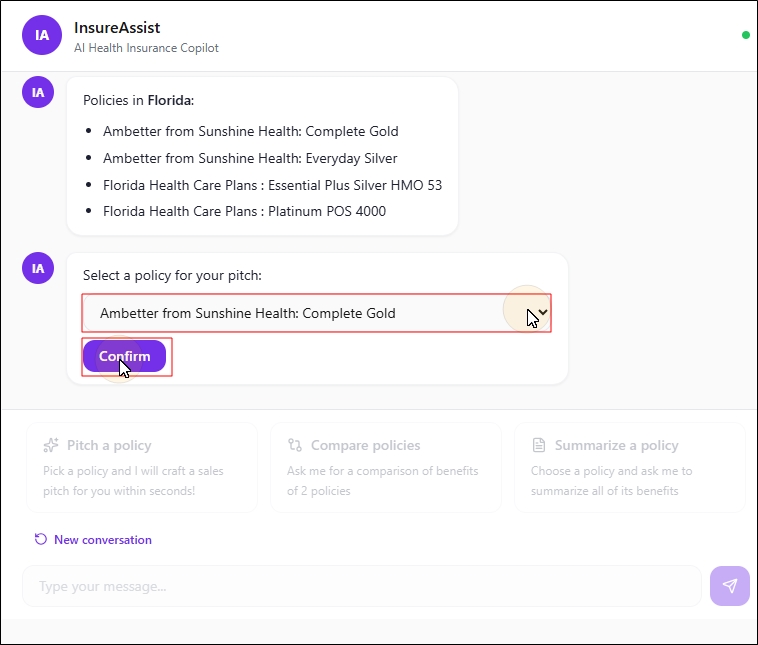
To draft a pitch, the AI agent requires additional information about the customer and their goals. Enter the benefits the customer is looking in the chat box, and provide the customer's age, location, and any other relevant information which is needed to create a tailored, focussed sales pitch.
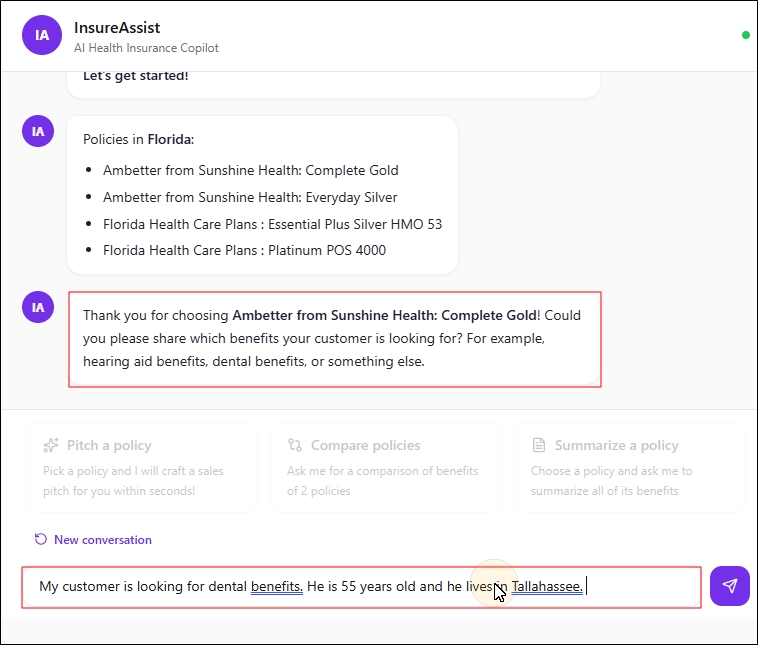
Once all the fields are filled, the AI agent drafts the pitch as shown below.
Use-case 2 : Compare Policies
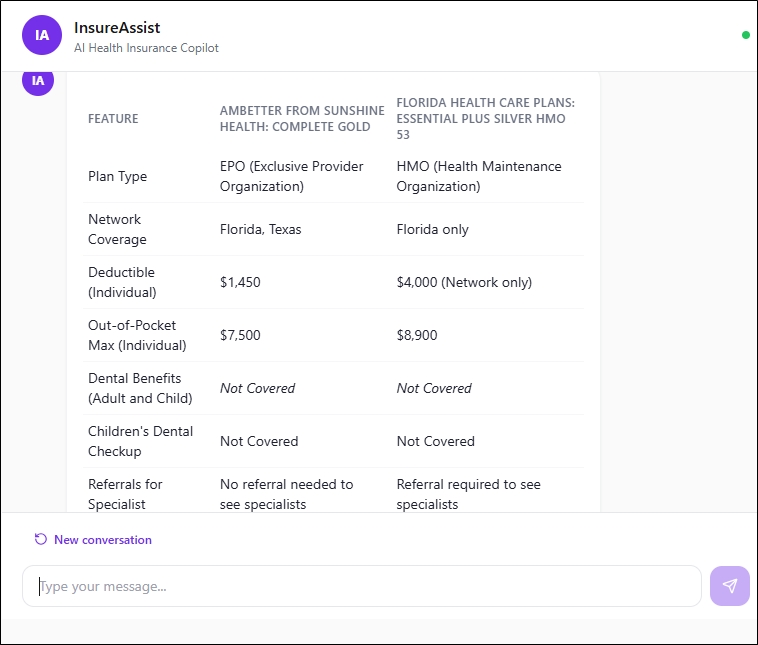
Clicking on this option/ prompt would result in the AI agent compare benefits between two policies Some example benefits include doctor visits, urgent care, network coverage, deductibles, out-of-pocket expenses, dental benefits , etc.
-
Click Compare Policies.
-
In Select two policies to compare, choose Policy 1 and Policy 2 from the dropdowns.
-
Click Confirm.
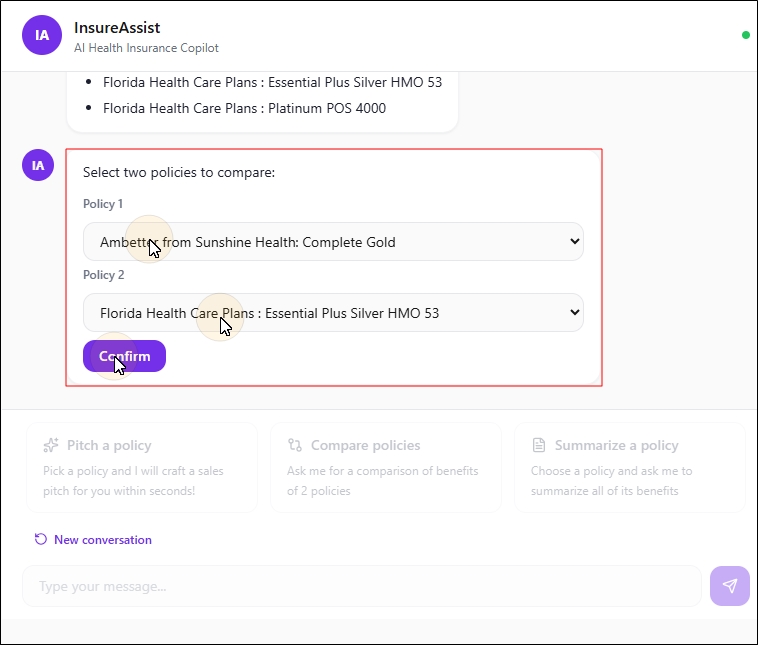
For an accurate, tailored comparison, enter the benefits the customer is looking for in the text box, then provide the customer's age, location, and any other relevant information needed to generate a suitable comparison. Based on the information you provided, the AI agent will generate a comparison chart for you.
Use-case 3 : Summarize a Policy
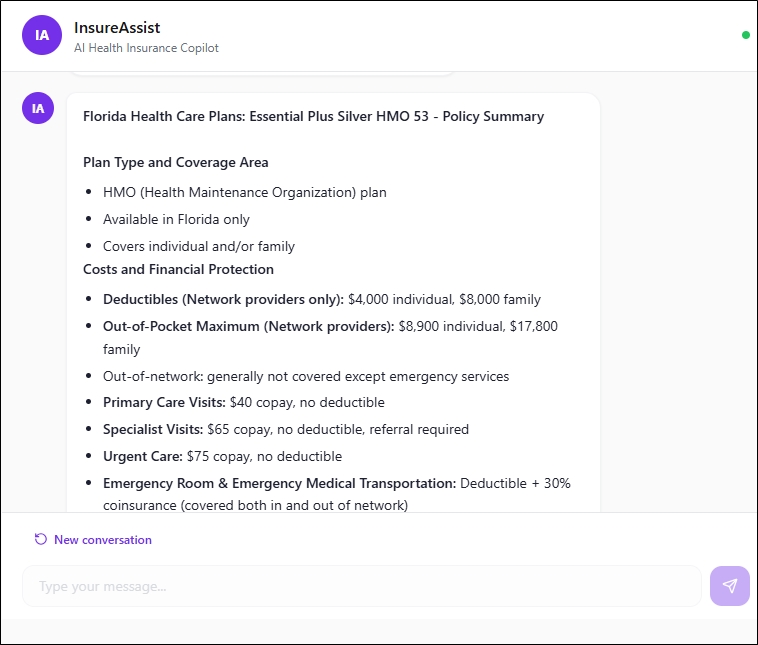
Clicking on this option results result in the AI agent summarize benefits of a particular health insurance policy.
-
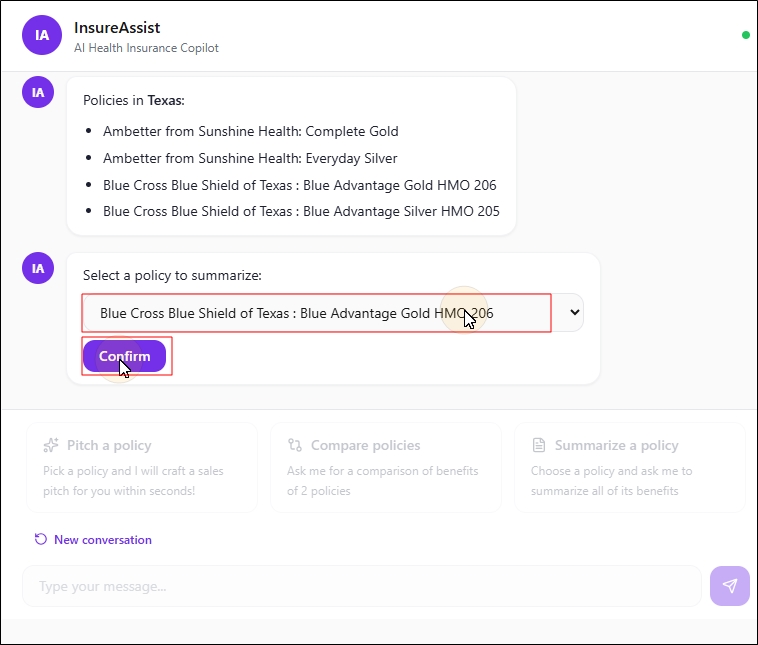
Click Summarize a policy.
-
Select a policy from the Select a policy to summarize dropdown.
-
Click Confirm.
The summarized policy details will be generated by the AI agent.
Use-case 4 : Simply Ask A Policy-Related Query
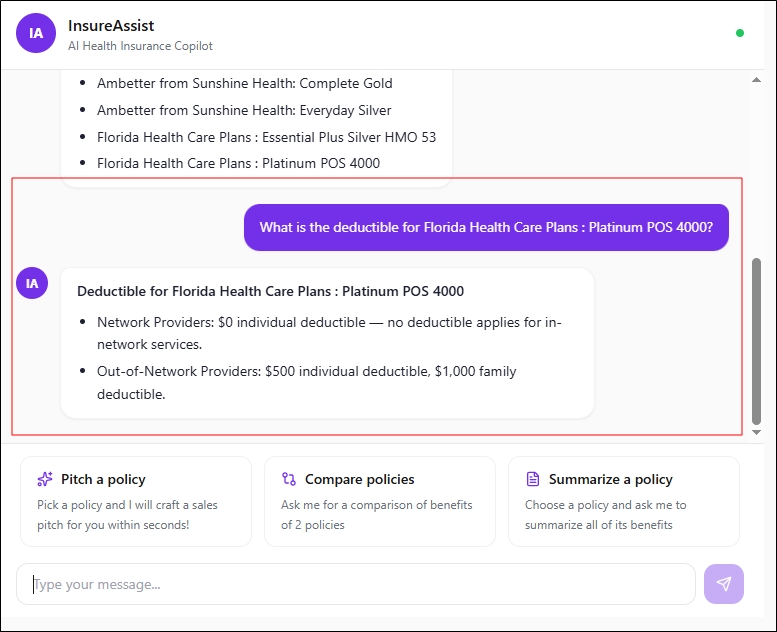
The health insurance seller can simply ask a policy related query. Eg. “What is the copay on urgent care in the Essential Plus Silver Plan”, “What is the deductible of the Ambetter from Sunshine Health Plans?”.
In such cases, the AI agent retrives the relevant information from the knowledge base and responds to the customer. In case any question is asked which is not part of the knowledge base, it responds back with an “I don’t know” message. All responses are grounded in the knowledge base.