
Agentic Solution for Personal Loan Origination for Customers
This article describes the Agentic Solution for Personal Loan Origination for Indian banks and financial institutions from a customer’s perspective. You will find here the steps a customer goes through to apply for a loan on a financial institute’s portal. In this article, the terms “borrower” and “customer” have been used interchangeably to refer to a prospect interested in taking a loan.
Agentic Solution Structure
The Agentic AI Solution for Personal Loan Origination consists of five AI agents, out of which four are responsible for automating the loan application process
-
Intent Detection Agent
-
AI Pre-Qualification Agent
-
AI Pre-Qualified Offer Agent
-
Documentation Agent
The agent that interacts with the customer is the AI Customer Service Agent. It also responds to any incoming customer queries from the knowledge base it is trained on. Next, we’ll look at all the agents that are working seamlessly in the background to streamline the loan application journey.
Intent Detection Agent
At the very first customer touchpoint, when a customer lands on your platform/portal and asks a query, the AI Customer Service Agent passes the query to the Intent Detection Agent which identifies the customer’s intent. If they are simply asking a query, it routes the customer message back to the AI Customer Service Agent to find a suitable response from the bank’s knowledge base. But if the intent detection agent identifies the customer wants a personal loan, it routes it to the AI Pre-Qualification Agent to kickstart the loan application journey.
The customer may have landed on your website for multiple reasons. The job of the Intent Detection Agent is to figure out if the customer's goal for coming to your website is to secure a loan.
Note. The article shows how Agentic Solution for Personal Loan Organization works by assuming that the customer
Has a job (is salaried)
Needs an unsecured personal loan
Doesn't have an account with your bank or financial institution (i.e they are a “New to Bank” customer)
The Intent Detection Agent identifies customer intent when the borrower clicks on "I want to apply for a personal loan."
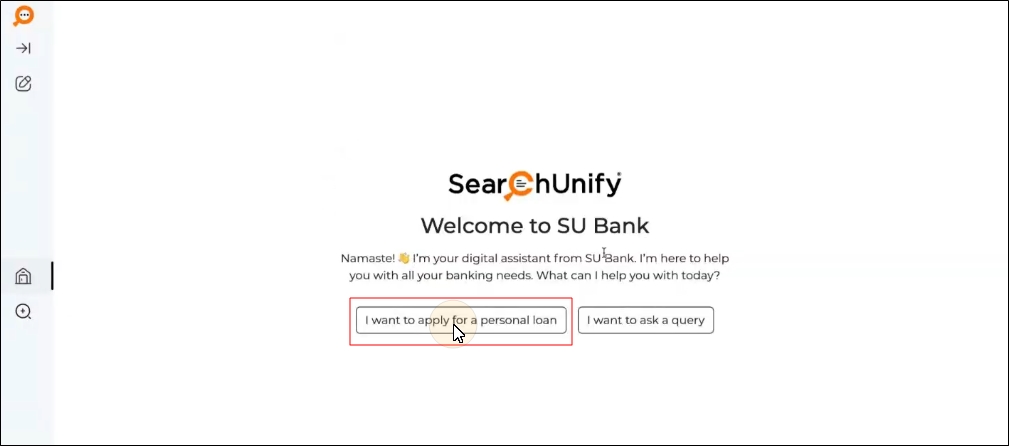
Fig. A snapshot of a customer expressing their intent by clicking on “I want to apply for a personal loan."
Once the intent has been identified (i.e asking for a loan), the AI Customer Service Agent routes the customer to the AI Pre-Qualification Agent.
Note: Note: This Agentic Solution is presently designed to handle only personal loan applications.
AI Pre-Qualification Agent
The job of the AI Pre-Qualification Agent is to gather all the necessary information that is required to make a pre-qualified loan offer. It gathers the details by interacting with the customers using a chat interface. The AI Pre-Qualification Agent needs three kinds of details from the customer:
-
Employer and income details
-
Personal details
-
Desired loan amount
Income Details
The AI Pre-Qualification Agent asks the customer several questions to ascertain the:
-
Registered name of the customer's employer
-
Customer's salary
Note : The AI Pre-Qualification Agent denies the loan if the customer’s salary is less than INR 20,000 a month
-
Work experience of the customer in their current company
-
Details of existing monthly liabilities and net monthly income after deductions
Note: The AI Pre-Qualification Agent denies the loan if the customer's liabilities to net monthly income ratio is more than 70%. In other words, if the customer already spends 70% or more of their salary on fixed expenses, such as home loan, children’s education, and utilities, the loan application will be rejected
Personal Details
The AI Pre-Qualification Agent asks the customer several questions to ascertain the:
-
Customer's age
Note: The AI Pre-Qualification Agent denies the loan if the customer is younger than 21 or older than 60.
-
Mobile number of the customer
-
Email address of the customer
Note: The AI Pre-Qualification Agent doesn't proceed further until the customer shares their email address.
-
Aadhar details of the customer
-
PAN of the customer
Note: The AI Pre-Qualification Agent needs the PAN to pull the customer's CIBIL score. The customer has to give their approval to the agent before the Agent can pull the CIBIL score. If the customer refuses to give their approval for the CIBIL pull, then the loan application is rejected.
-
Present address of the customer
-
Permanent address of the customer
-
Type of residence; the customer can choose from:
-
Owned - Self
-
Owned - Family
-
Rented with family
-
Rented with friends
-
Rented - Alone
-
Company Provided Accommodation
-
PG
-
Desired loan amount
The AI Pre-Qualification Agent asks the customer the loan amount.
Note: The AI Pre-Qualification Agent denies the loan if the desired loan amount is less than 1 lakh or more than 20 lakhs, then the loan request is rejected.
Please note that all the information and the respective criteria mentioned above are configurable according to the bank or financial institution’s SOP.
AI Pre-Qualification Agent Workflow
This section displays an interaction between the AI Pre-Qualification Agent and a customer. The Intent Detection Agent has already ascertained that the customer intends to get a loan.
-
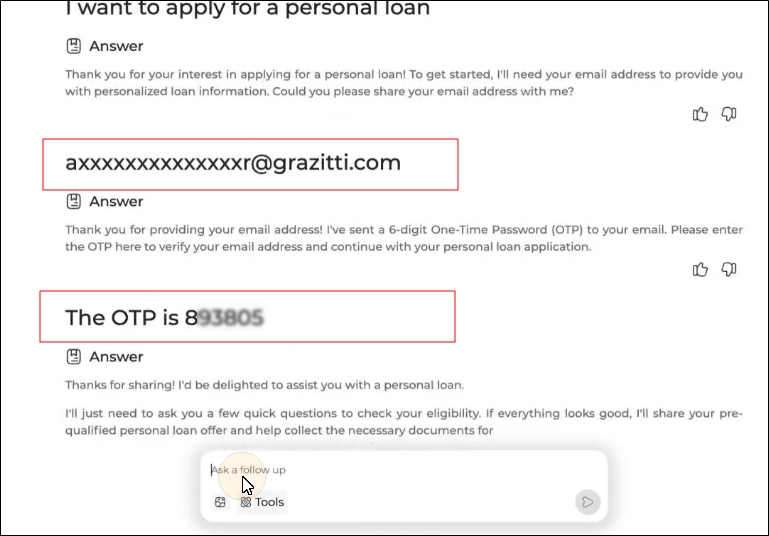
The AI Pre-Qualification Agent asks the customer to enter their email. As shown in the image below, part of the email ID will be masked as email is considered as a PII. Once the customer has entered the email in the text box, the AI Pre-Qualification Agent sends the customer an OTP to confirm their email. The customer enters the OTP in the textbox. A cursor has been placed in the textbox to illustrate where the customer has to enter their details.
-
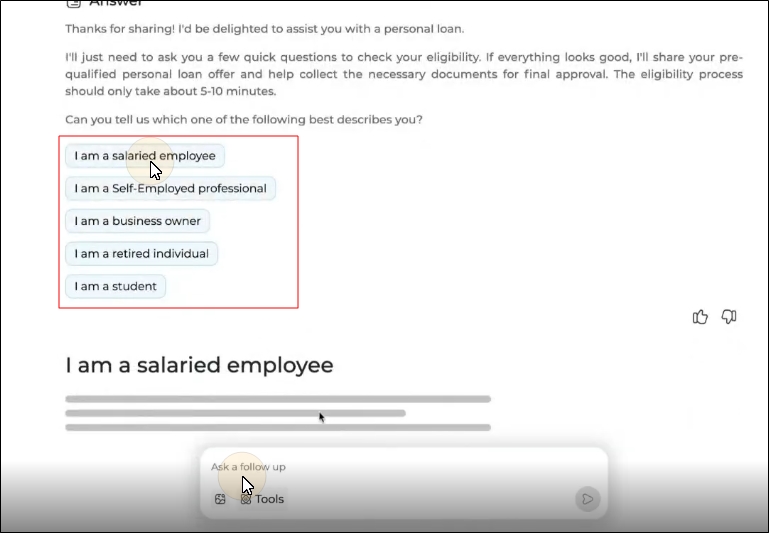
The AI Pre-Qualification Agent asks the customer to select an option which best describes their employment status. The following options are available:
-
I am a salaried employee
-
I am a Self-Employed professional
-
I am a business owner
-
I am a retired individual
-
I am a student
Note: Since this solution is designed for a salaried employee, you can choose “I am a salaried employee” from the options shared to proceed with the loan application. Similar agentic solutions can also be developed for other personas mentioned below.
-
-
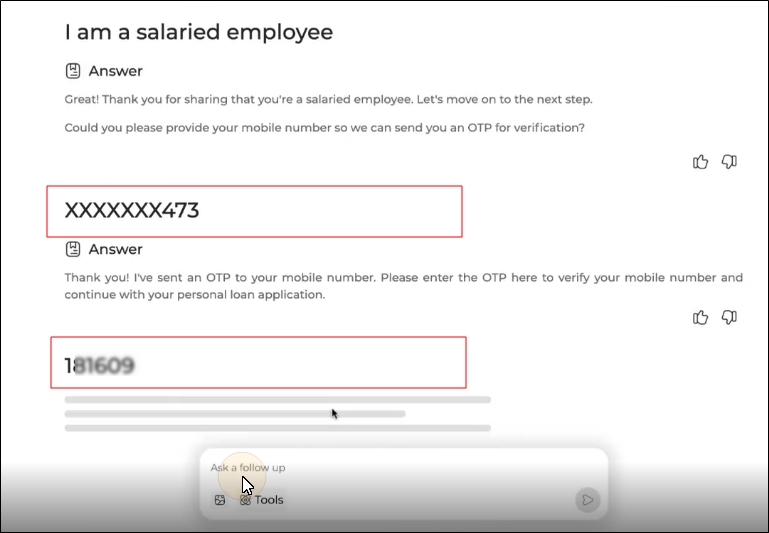
The customer is asked to enter their mobile number in the textbox. Part of the mobile number shared by the customer is masked as they are identified as PII. The AI Pre-Qualification Agent sends the customer an OTP to confirm their mobile number. The customer enters the OTP in the textbox.
-
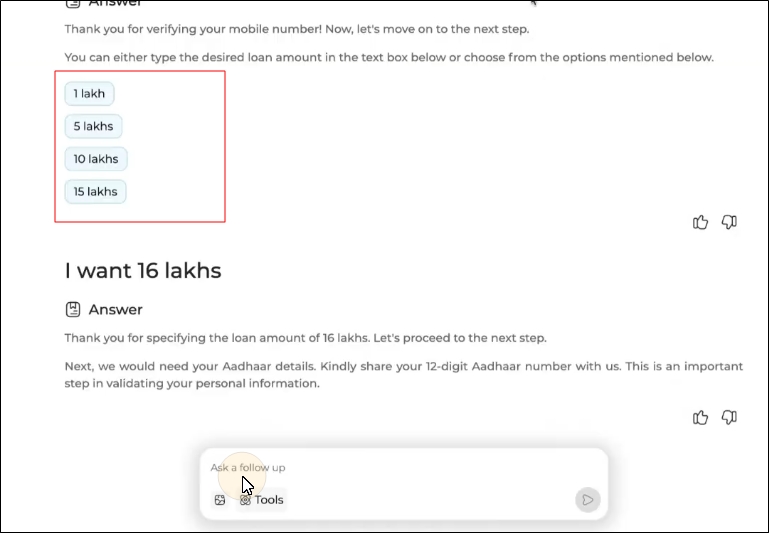
The customer either selects a loan amount from the given options or enters the desired loan amount into the textbox.
Note: The AI Pre-Qualification Agent denies the loan if the desired loan amount is less than 1 lakh or more than 20 lakhs, then the loan application is rejected. These values are configurable.
-
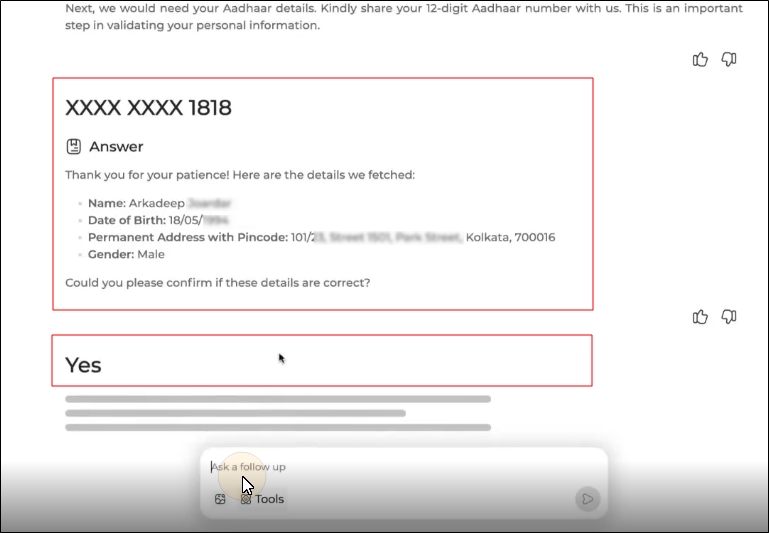
The customer enters their Aadhar ID into the textbox. The Agent calls a core system API, runs a check in the background and displays the customer’s name, date of birth, permanent address and gender. It reduces the need of asking name, date of birth, permanent address and gender separately. The customer is asked to verify if the fetched details are correct by typing "Yes" in the text box.
-
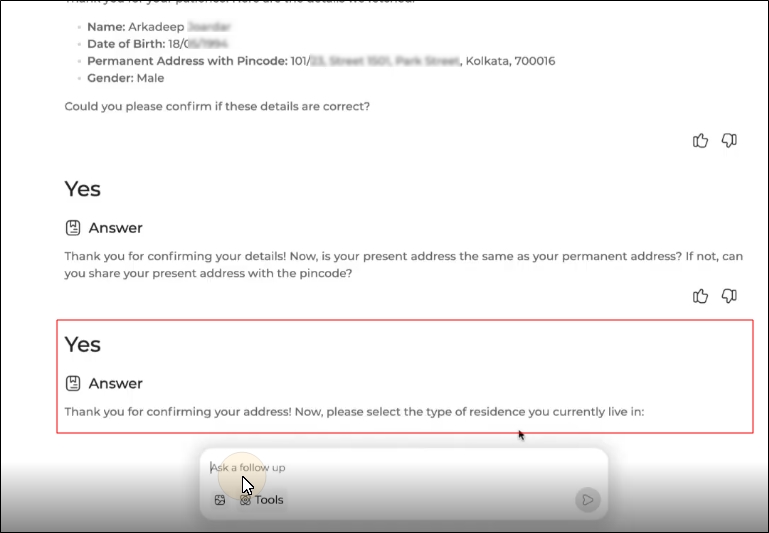
Next, the AI Pre-Qualification Agent asks for the customer’s present address. If it's the same as the permanent address mentioned on Aadhar, then the customer can type "Yes" and press Enter. Else, they can enter their present address along with a pincode.
-
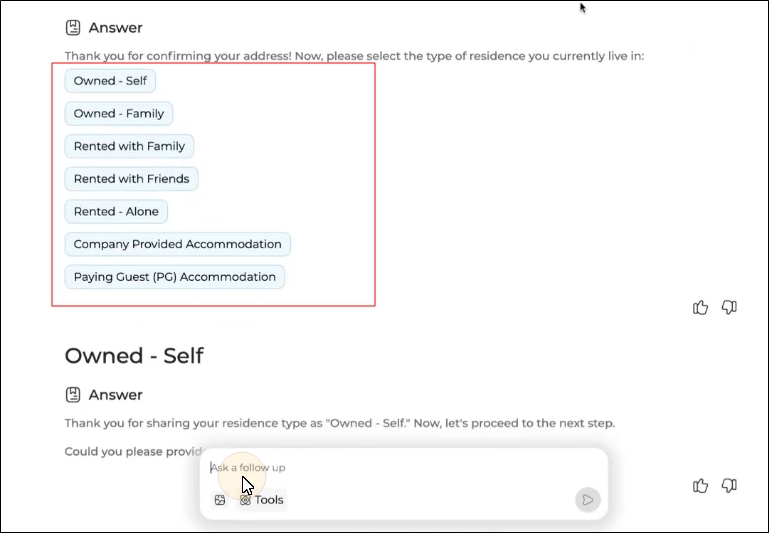
The AI Pre-Qualification Agent asks the customer to specify their residence type. The following options are available:
-
Owned - Self
-
Owned - Family
-
Rented with family
-
Rented with friends
-
Rented - Alone
-
Company Provided Accommodation
-
PG
-
-
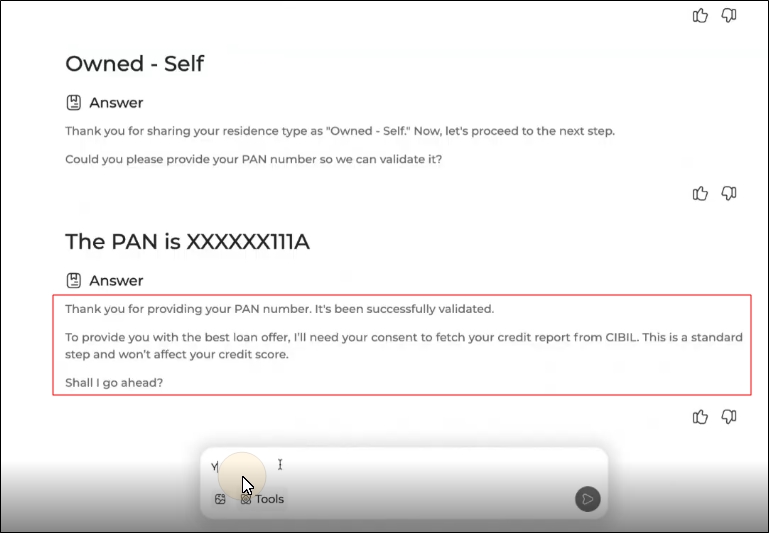
The AI Pre-Qualification Agent asks the customer to enter their PAN. Once the PAN is shared by the customer, the AI agent calls a core system API to validate the PAN. Once the PAN is validated, it also requests the customer to allow the AI agent to fetch their CIBIL (or any preferred credit bureau) score. This is a soft credit check and does not affect the customer's score.
Note: The AI Pre-Qualification Agent needs the PAN to pull the customer's CIBIL score. The customer has to give their approval to the agent before the Agent can pull the CIBIL score. If the customer refuses to give their approval for the CIBIL pull, then the loan application is rejected.
-
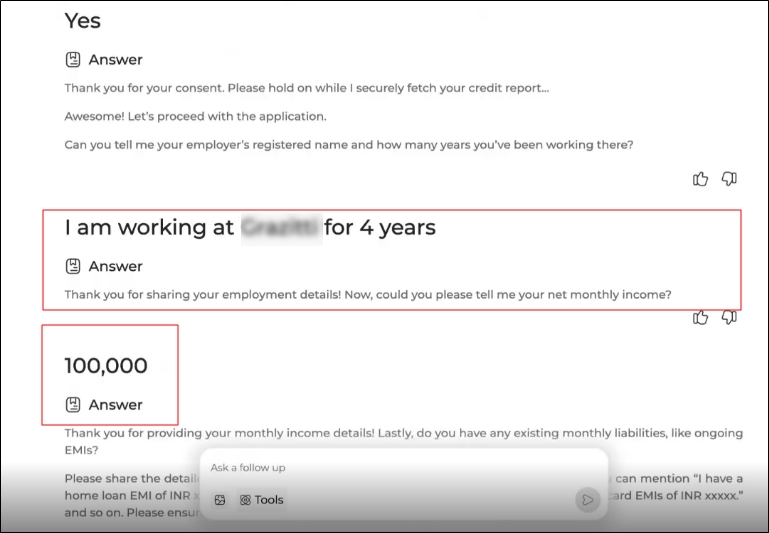
If the CIBIL score is greater than the limit shared by the bank/financial institution, the customer is asked to proceed with the loan application and enter their employment details. Customers can enter the details one at a time, or write a sentence containing their company's name, the period of their collaboration with the company and monthly salary.
-
The last step in the AI Pre-Qualification Agent flow is to add the monthly liabilities. Here, by liabilities, the Agent needs to know the customer’s debts and unavoidable monthly expenses. Based on the income and liabilities shared by the customer, the liability-to-income ratio (LTI) is calculated. For this solution, if the LTI is >70%, the loan application is rejected. This limit is configurable as per bank’s SOP.
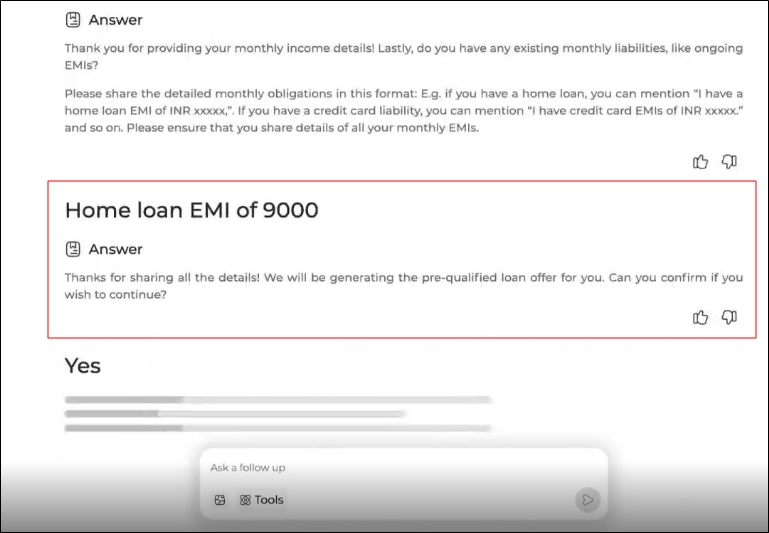
Once all the required details have been shared and validated, the AI Agent asks the customer’s confirmation to generate a pre-qualified offer. The offer is generated by the AI Pre-Qualified Offer Agent. Once the customer gives their confirmation, the loan application is routed to the AI Pre-Qualified Offer Agent.
AI Pre-Qualified Offer Agent
The AI Pre-Qualified Offer Agent computes the personalized pre-qualified loan offers instantly based on the details provided by the AI Pre-Qualification Agent. If it doesn’t find a reason for disapproval, some of them being low salary or high liabilities, then it produces a pre-qualified loan offer. The pre-qualified loan offer is generated after an analysis of:
-
Income details
-
Existing liabilities
-
Credit report
-
Repayment history
-
Debt-to-income ratio
Note: Income and personal details cannot be changed at this stage. If you want to update your salary, change your address, or update another detail, you will need to restart the loan application journey from the beginning as a fresh application.
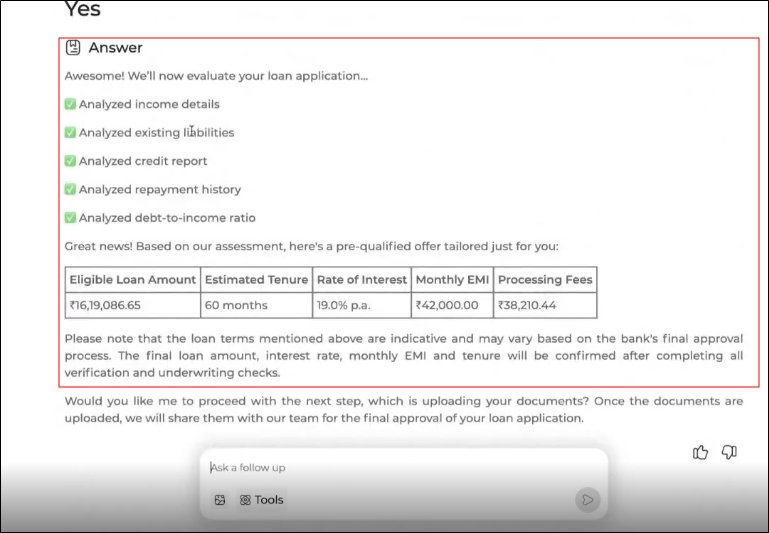
The offer generated by the AI Pre-Qualified Offer Agent isn’t legally binding. It doesn’t mean that the customer will definitely get the exact amount at the specified rate of interest and other loan terms. To be eligible for a legally binding loan offer, the customer has to share necessary documents. The uploaded documents will be collected and validated by the Documentation Agent.
Documentation Agent
Documentation Agent is triggered once the pre-qualified loan offer has been made and the customer has accepted the pre-qualified offer and moved forward with the loan application. The customer is asked to upload the following documents as PDF files from the textbox:
-
Bank statement of last 3 months (as a proof of income)
-
Salary Slips of last 3 months (as a proof of income)
-
PAN (as a proof of identity)
-
Aadhar (as a proof of address)
Note: The document types and their corresponding file formats are configurable as per bank’s SOPs.
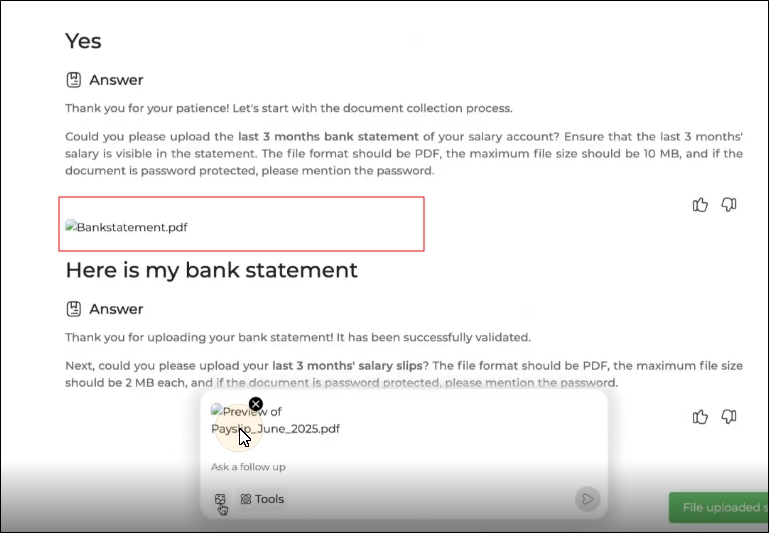
The Documentation Agent does an verification of the uploaded documents and validates the customer details.
In case it finds any anomalies in the details provided by the customer and the uploaded document, it asks the customer to upload the document again. An example of an anomaly is when a customer has entered “1234567890” as their PAN but the document shows the PAN to be “1234567809”.
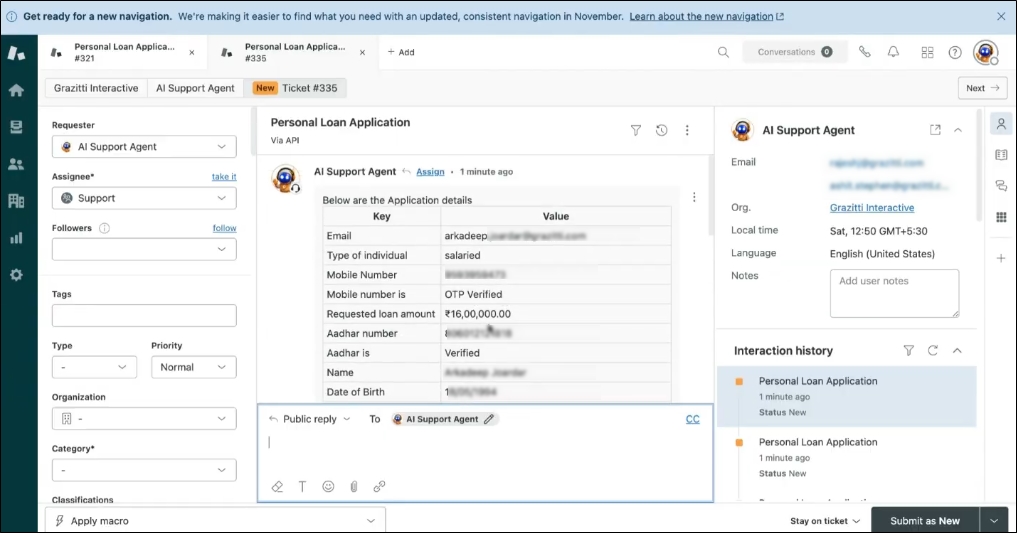
If the details in the uploaded documents match, then the loan application is forwarded to the financial institution’s ticketing platform and an application ID is shared with the customer.
Note : Loan applications can be shared in a ticketing platform (such as Zendesk), email or any medium of choice by the bank.
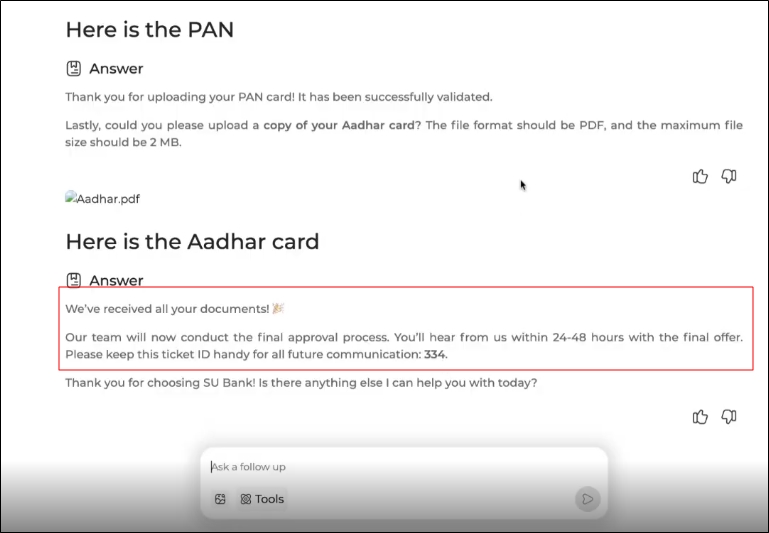
Resolving Customer’s Queries
During the loan application journey, the customer can come across various queries. In such a case, if a customer asks a query, the AI Customer Service Agent is tasked with responding to the customer by searching the knowledge base. The AI Customer Service Agent only responds to the customer from the knowledge base and if it finds a query which cannot be responded from the knowledge base, it responds back with an “I don’t know” message. After the response is given, the AI Customer Service Agent subtly nudges the customer to continue with the loan application journey.
Handing over the application to the bank
The image below depicts a sample of how the bank will receive the completed loan application. If the loan application is recommended or escalated by the Agentic Solution, it will be handed over to a loan underwriter. If it is rejected or the customer has abandoned the application during the flow, it will be handed over to a quality auditor, who can retrieve the application.
Please note that we can share the completed loan application in email, ticketing platform or a medium of the bank’s choice.