

View Last Sync Date and Time
The Last Sync column displays one of the following status
-
<datetime> shows the start time of the last crawl in UTC. For example, if a crawl started at 08:00 on 10 January 2026 and ended at 09:00 the same day, the Last Sync column shows 2026-01-10 08:00. All documents updated, added, or removed before the crawl start are indexed; depending on the content source, some changes during the crawl may also be indexed.
-
Message: Manual crawl started on <datetime> is displayed when the crawl is in progress.
-
Message: Need to crawl manually is displayed when the automatic crawl has failed and the admin must crawl the content source manually.
-
Message: Subsequent crawling was stuck <n> times is displayed when one or more attempts to crawl a content source returned an error; <n> is replaced by the number of failed attempts.
You can sort the Last Sync column by crawl start time using the column's Sort button.
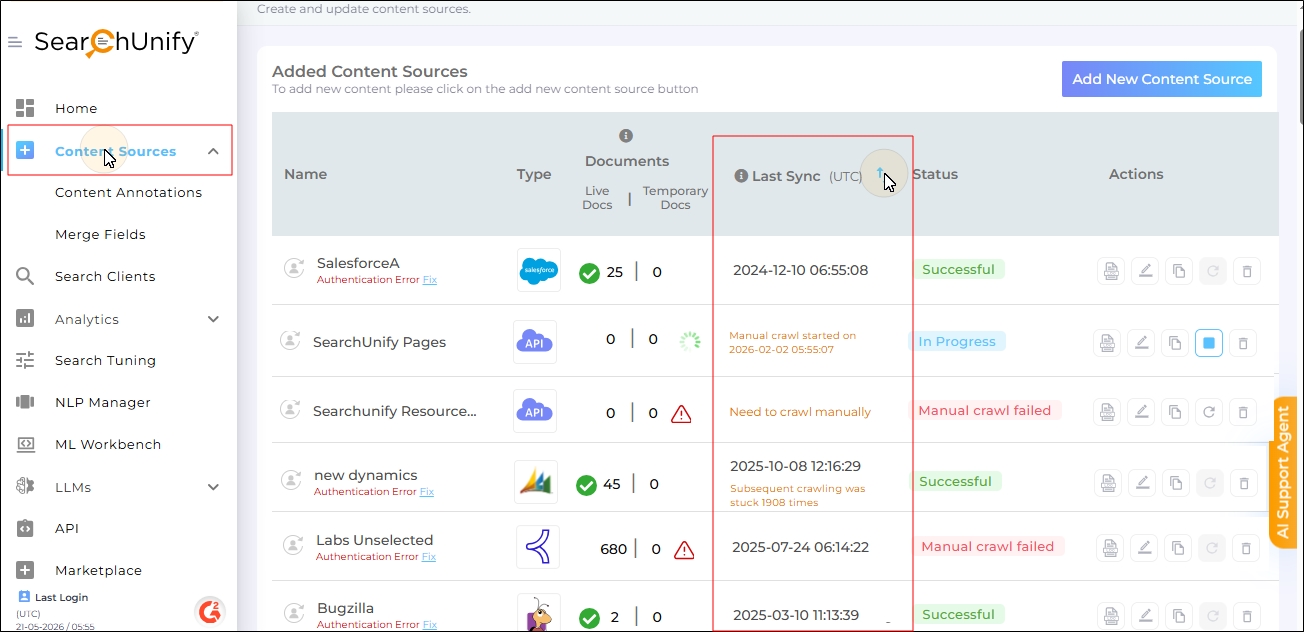
Fig. A snapshot of the Last Sync column.