

Release Notes: SearchUnify Q3 '26 (Patch)
We are excited to announce the general availability of the SearchUnify Q3 ‘26 Patch Release. This update builds directly upon the features introduced last month, focusing on enhanced analytics visibility, streamlined administrative control, and optimized agent experiences.
Here is a high-level summary of what’s new in this release:
-
SearchUnify: Updates the Content Experience Feedback report to provide more details on user feedback.
-
Agentic AI Suite: Displays a section on AI Agent Partner activity in LLM Token Consumption.
-
AI Case Quality Auditor: Delivers deeper analytics and greater visibility into individual contributions on multi-collaborator cases.
-
AI Agent Partner: Adds token consumption monitoring and license management for admins, while simplifying response feedback for support agents.
-
AI Support Agent: Streamlines workflows via a brand-new UI, sentiment-aware responses, improved fallback handling, and accurate deflection reporting.
Full details for each update are provided below.
SearchUnify
Text Feedback and Reported By Columns Added to Content Experience Feedback
The Content Experience Feedback report now displays the Feedback Details dialog with two new columns:
-
Feedback displays the textual feedback shared by a user.
-
Reported By displays the email of the user who shared the feedback
The columns display N/A if either the user email is unknown or the user didn't share a textual feedback.

Fig. A snapshot of Feedback Details with two new columns.
To access the dialog, go to Analytics > Search Analytics > Overview > Content Experience Feedback and click on Ratings.
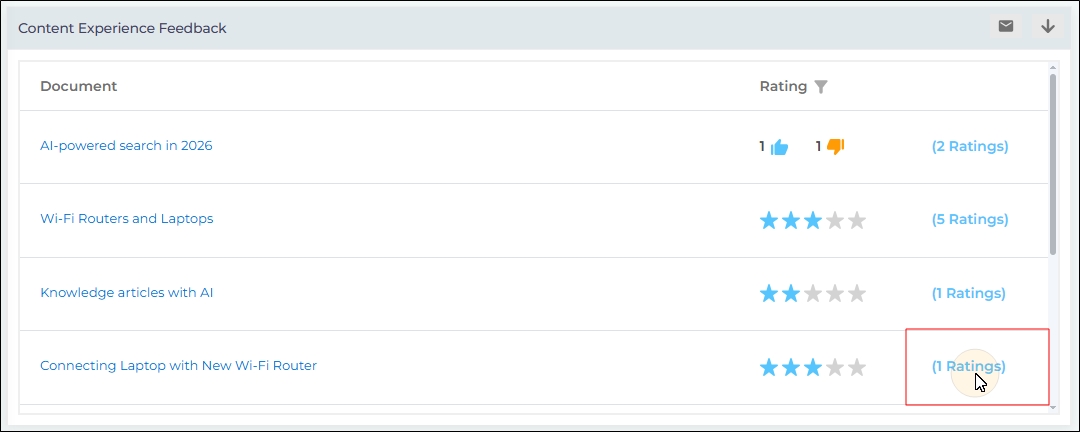
Fig. A snapshot of Content Experience Feedback.
Agentic AI Suite
AI Agent Partner Usage Tracking in LLM Token Consumption
The LLM Token Consumption report in the Agentic AI Suite now includes AI Agent Partner activity, providing administrators greater visibility into LLM usage across the platform.
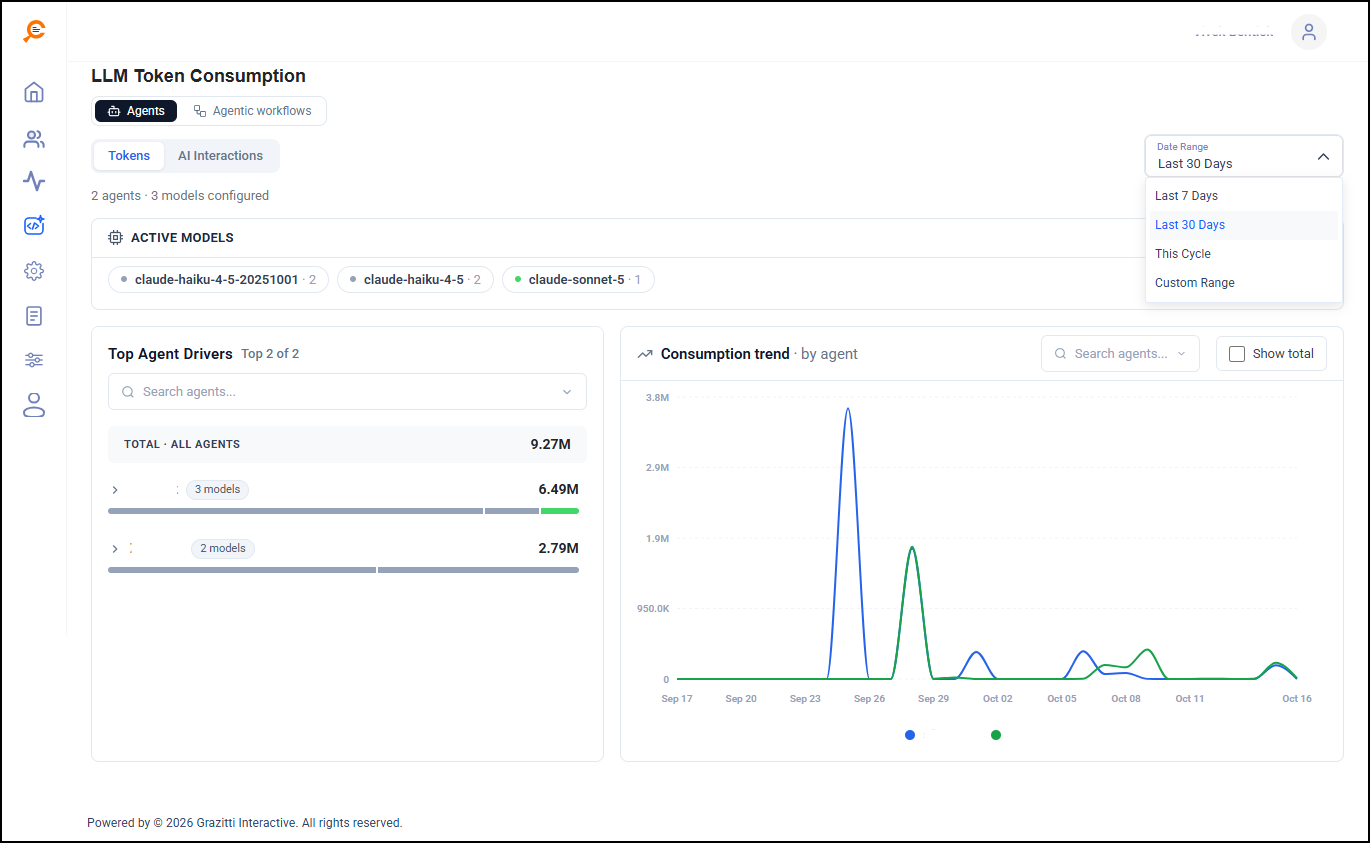
Fig. A snapshot of LLM Token Consumption.
AI Agent Partner events are now captured and reflected in the existing Tokens and AI Interactions sections, enabling administrators to monitor token consumption and AI interactions associated with AI Agent Partner alongside other agentic applications.
This enhancement provides a more comprehensive view of LLM consumption, helping organizations understand usage patterns, track resource utilization, and make informed decisions about AI consumption and capacity planning.
AI Case Quality Auditor
Enhanced Multi-Agent Case Quality Audit Reports
The Case Quality Auditor now provides more details in the audit reports for the cases that are handled by multiple support agents.
The enhanced report presents individual Agent Performance Scores alongside Overall Case QA Score, with parameter-wise evaluations, rule-level deductions, AI-generated justifications, and supporting conversations. It also includes the details of the participating agents, issue and resolution summaries, SLA performance, escalation information (if it exists), and an aggregated case-level assessment.
These enhancements give QA managers and auditors greater visibility into each agent's contribution, helping them understand the influence of individual evaluations on overall case quality assessment so that the managers can identify areas for targeted improvement.
Improved Feedback Support for Multi-Agent Workflows
Multiagent workflows now make it easier to collect and manage feedback from multiple agents working on the same task.
Feedback from different agents can be combined and reviewed while keeping track of which agent provided it and which task it relates to. This helps managers identify areas for improvement and use relevant feedback to improve their workflows.
AI Agent Partner
Simplified Feedback Submission and Enhanced Feedback Analysis in AI Agent Partner
AI Agent Partner now offers a streamlined feedback experience, making it easier for support agents to share feedback on AI-generated responses, recommendations, and insights while providing administrators with deeper visibility into feedback trends and quality.
Support agents can now submit feedback through a simplified text-based popup without manually selecting predefined reasons. AI Agent Partner automatically identifies and categorizes feedback based on the submitted comments, reducing manual effort and enabling structured feedback analysis.
The enhanced Feedback Analysis report provides administrators and support managers with greater visibility through:
-
Advanced Filtering and Search: Filter feedback by feature, agent, team, or feedback type (positive or negative), and search using case IDs, ticket IDs, or comments.
-
Feedback Coverage Metrics: Track new summary metrics, including Feedback Coverage %, to understand how extensively agents provide feedback on AI-generated assistance.
-
Feedback Trends and Feature-Level Analysis: Review feedback patterns and evaluate the quality and relevance of AI-generated assistance across different features.
-
Contextual Feedback Review: Access the original AI-generated content associated with individual feedback entries, including case summaries, timelines, responses, and recommendations.
-
Enhanced CSV Exports: Export feedback records along with associated conversation content for more detailed analysis.
Together, these enhancements simplify feedback collection, help support teams identify recurring issues, and provide actionable insights to improve the quality of AI-generated assistance and overall agent productivity.
Centralized License Management for AI Agent Partner
The Agentic AI Suite now introduces License Management for AI Agent Partner, enabling administrators to manage user access and license allocation from a centralized interface.
Available under Administration → License Management, the new interface provides visibility into purchased, assigned, and available licenses, allowing administrators to monitor utilization and manage access efficiently.
Key capabilities include:
-
License Allocation and Reassignment: Assign, remove, and reassign licenses to support agents while tracking available seats.
-
Bulk License Management: Add or remove multiple users through CSV uploads, reducing manual administration.
-
User Activation and Inactivity Tracking: Monitor license activation status and identify inactive users to optimize license utilization.
-
Automated Onboarding: Send onboarding emails to newly assigned users to help them activate their access.
-
License Expiry Visibility: View license expiration information and renewal notifications to support timely license planning.
-
License Activity Tracking: Review license-related administrative changes through configuration audit records.
These capabilities simplify license administration, improve visibility into license utilization, and help organizations manage AI Agent Partner access more efficiently as adoption grows.
AI Support Agent
Improved Session Management in AI Support Agent
AI Support Agent now supports automatic session termination to ensure accurate session tracking and seamless support experience.
Sessions automatically close after a configurable period of inactivity, or after a configured activity, such as creating a support case or handling a conversation to a human agent. The changes prevent inactive sessions from remaining open indefinitely and improve the accuracy of session duration and conversation analytics.
When a session ends, users can provide feedback and/or start a new chat. This enhancement provides admins better visibility into the support interactions.
Streamlined Case Creation with Context-Aware Autofill in AI Support Agent
AI Support Agent now offers an enhanced case creation experience by automatically populating supported case fields with relevant information from the conversation and other available user details.
Users can review and edit the pre-filled form, provide missing information, and submit the case after clicking Confirm Case Creation.
This enhancement minimizes repetitive data entry, improves the accuracy of case information, and gives users greater control over case submissions.
Refreshed User Interface for AI Support Agent
AI Support Agent now features a redesigned conversational interface that delivers a cleaner, more intuitive support experience.
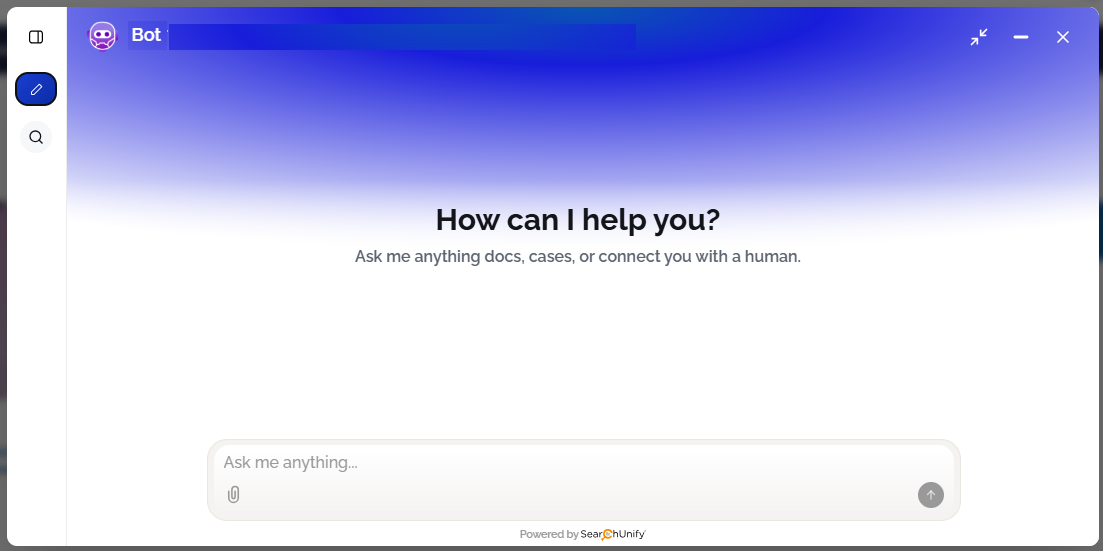
Fig. A snapshot of the new AI Support Agent UI.
The refreshed interface introduces updated branding, a redesigned welcome screen with suggested queries, improved message presentation, and streamlined navigation across compact and expanded chat views.
These enhancements make it easier for users to start conversations, navigate their chat history, access relevant information, and interact with the agent throughout their support journey.
Intelligent Contextual-Based Clarification
AI Support Agent now offers an improved clarification handling mechanism to understand ambiguous or incomplete user requests before providing responses or performing actions.
When a request has multiple possible interpretations or lacks the required information, the agent asks follow-up questions to identify the user's intent and gather the necessary details. It also uses available conversation context to avoid requesting information already provided. Additionally, if a user's query is vague or the returned search results are vague, the agent will ask a clarifying question to better navigate the results and generate an accurate response.
This enhancement reduces incorrect assumptions, improves the relevance of troubleshooting guidance, and enables more accurate tool execution with fewer unnecessary interactions.
Enhanced AI Support Agent Analytics with Deeper Conversation and Outcome Insights
AI Support Agent Analytics now provides a more comprehensive view of support performance through an enhanced Overview dashboard, offering greater visibility into conversation outcomes, deflection performance, customer satisfaction, and interaction trends.
The updated dashboard provides granular reporting across Deflection, Handover, Abandoned, and Unsuccessful conversations. Deflection tracks chats handled through AI self-service, while Handover captures interactions requiring human assistance through case creation or live-agent transfer. Abandoned conversations highlight instances where users leave before completing the support interaction, while Unsuccessful conversations identify unresolved interactions, including those involving negative feedback or explicit dissatisfaction.
Additionally, enhanced outcome breakdowns, interactive conversation journey visualizations, trend analysis, and conversation-level insights help administrators better understand support effectiveness and identify areas for improvement.
These enhancements enable organizations to measure self-service performance more accurately, identify unsuccessful or abandoned interactions, and make data-driven decisions to improve their customer support experience.
Sentiment Analysis for Conversations
AI Support Agent now provides sentiment analysis of completed support conversations, helping administrators gain deeper insights into customer experiences.
By analyzing and classifying conversations as positive, neutral, or negative, the feature provides visibility into customer sentiment patterns and trends. These insights help administrators identify recurring issues and topic clusters associated with customer dissatisfaction, enabling them to prioritize areas that need improvement.
This enhancement helps support teams better understand customer sentiment across past interactions and make informed decisions to improve knowledge coverage and the overall self-service support experience.
Improved Fallback Handling in AI Support Agent
AI Support Agent now offers a more resilient support experience with improved fallback handling when it cannot generate a response or retrieve relevant information.
If conversational response generation is unavailable, the agent displays relevant search results with titles and descriptions. When knowledge retrieval is unavailable, it guides users toward alternative support options, such as connecting with a live agent or creating a support case, depending on the available integrations.
This all is configurable from the Agentic AI Suite admin panel through Edit (the Agent) > Advanced Settings (tab).
This enhancement reduces dead-end interactions and helps users continue their support journey even when the agent cannot provide an immediate answer.
Improved Deflection Reporting with Explicit Dissatisfaction Detection in AI Support Agent
AI Support Agent now detects explicit expressions of user dissatisfaction within conversations to improve the accuracy of deflection reporting.
Previously, conversations could be counted as deflected even when the users indicated that the response was unhelpful, provided they did not create a support case or request a live agent. With this enhancement, such interactions are classified as Unsuccessful – Explicit Dissatisfaction in the analytics dashboard.
This improvement provides a more accurate view of conversation outcomes, helps prevent inflated deflection rates, and enables support administrators to better identify unsuccessful support interactions.
Configurable Handover Summaries for Salesforce Live Agent Transfer in AI Support Agent
AI Support Agent now supports configurable handover summary templates for Salesforce Live Agent Transfer, giving administrators greater control over how conversation context is shared with human support agents.
Administrators can choose between a Paragraph Summary, which provides a continuous narrative of the conversation, and a Structured Summary, which organizes the handover details into the customer issue, a concise summary, and sentiment information.
This enhancement helps receiving agents quickly understand the customer's issue and conversation context, reducing the need for customers to repeat information and enabling a more informed transition from AI to human support.