

SearchUnify Model Context Protocol (MCP)
SearchUnify Model Context Protocol (MCP) enables compatible AI applications to connect with SearchUnify and use SearchUnify capabilities as callable tools.
With SearchUnify MCP, AI assistants such as Claude and ChatGPT can retrieve trusted enterprise knowledge from SearchUnify directly inside a conversation. This allows users to search indexed content, discover filters, retrieve analytics, and use SearchUnify-powered context without switching applications.
SearchUnify MCP helps organizations bring governed, current, and searchable enterprise knowledge into AI workflows without building a custom integration for every AI client.
Note: MCP capabilities were added and backported in the Q2 ’25 release. If your SearchUnify instance is on Q2 ’25 or a newer release, contact SearchUnify Support or Professional Services to confirm that MCP-related updates are deployed on your instance.
What is MCP
Model Context Protocol (MCP) is an open standard that allows AI applications to connect with external systems through a common interface.
Instead of building a separate integration for every AI assistant, MCP allows a compatible AI client to discover and invoke tools exposed by an MCP server. In the SearchUnify MCP architecture, the AI application acts as the MCP host, and SearchUnify MCP acts as the MCP server.
The host can call SearchUnify MCP tools during a conversation to retrieve enterprise search results, filter options, and analytics data.
MCP Architecture
SearchUnify MCP follows the standard MCP client-server architecture.
MCP host
The MCP host is the AI application that the user interacts with. Examples include Claude, ChatGPT, and other MCP-compatible clients.
The host sends tool requests to the MCP server when it needs external context or action.
MCP server
SearchUnify MCP acts as the MCP server. It exposes SearchUnify capabilities as tools that the host can discover and invoke.
SearchUnify platform
SearchUnify processes the request, applies the configured authentication and search client context, and returns results from indexed content or analytics data.
Key Benefits of SearchUnify MCP
Enterprise search inside AI workflows
SearchUnify MCP allows users to search SearchUnify-indexed enterprise content directly from supported AI applications. Users can ask questions in natural language and receive responses grounded in SearchUnify content.
Reduced custom integration effort
Organizations can connect MCP-compatible AI applications to SearchUnify through a standard protocol instead of building and maintaining separate integrations for every assistant or client.
Context-aware AI assistance
AI assistants can use live SearchUnify data instead of relying only on static model knowledge. This helps users retrieve relevant, organization-specific information during conversations.
Support for search analytics
SearchUnify MCP also exposes analytics tools, allowing authorized users to retrieve search reporting data such as zero-result queries, no-click queries, search queries with results, and search conversions.
Flexible setup options
SearchUnify MCP supports both admin-friendly connection flows for Claude and ChatGPT and developer-oriented setup methods using HTTP or stdio transport.
Common Use Cases
Enterprise Q&A
Users can ask an AI assistant to search SearchUnify for product documentation, support content, knowledge articles, community posts, or other indexed enterprise content.
Support and knowledge workflows
Support, Success, and Knowledge teams can use SearchUnify MCP to retrieve relevant articles and identify content gaps directly from AI-assisted workflows.
Search refinement
AI assistants can discover available filters before running a refined search. This helps users narrow results by content type, source, product, category, or other available facets.
Search analytics review
Authorized users can retrieve SearchUnify analytics reports to identify zero-result queries, no-click queries, popular queries, and conversion trends.
Developer and power-user workflows
Developers and advanced users can connect SearchUnify MCP to MCP-compatible local or remote clients using HTTP or stdio transport.
Supported Hosts
SearchUnify MCP supports MCP-compatible clients, including:
| Host |
Setup Type |
Recommended For |
|
Claude |
Admin Use |
Connecting SearchUnify MCP as a custom connector |
|
ChatGPT |
Admin Use |
Creating and connecting a custom MCP app |
|
MCP-compatible developer clients |
Developer Use |
Local or remote development workflows |
|
Custom MCP hosts |
Developer Use |
Advanced integrations and testing |
Supported Connection Models
SearchUnify MCP supports the following transport mechanisms:
-
HTTP transport for remotely hosted MCP deployments
-
stdio transport for locally spawned MCP server setups
Depending on your deployment model, SearchUnify MCP can run using http, stdio, or both.
Supported Authentication and Connection Patterns
SearchUnify MCP supports the following authentication methods:
-
API Key
-
OAuth 2.0 Password Grant
-
OAuth 2.0 Client Credentials Grant
-
Claude Public Directory (OAuth)
-
Tool-Based Login through /mcp-connect (No Browser Required)
For admin-managed Claude and ChatGPT setup, SearchUnify MCP uses a login flow that asks for the SearchUnify instance URL, Search Client UID, OAuth Client ID, and OAuth Client Secret.
For developer-managed setup, SearchUnify MCP can be configured with API key or OAuth credentials depending on the selected transport and client configuration.
Note: Some connection patterns are client-specific. For example, Claude Public Directory is intended for Claude-compatible discovery and OAuth-based onboarding, while /mcp-connect is intended for tool-based login flows that do not require a browser.
Before you begin
To use SearchUnify MCP, you need:
-
Your SearchUnify instance URL
-
A Search Client UID that you want to integrate with the SearchUnify MCP
-
An MCP-compatible AI client
-
Required API scope access
-
Valid authentication credentials - SearchUnify Admin Panel’s Username and Password.OAuth Client ID and OAuth Client Secret, if using the admin login flow
To obtain the OAuth Client ID and OAuth Client Secret, create an API Client in SearchUnify. The current API Client documentation explains that users can create an API Client to generate a Client ID and Client Secret.
Important
-
For SearchUnify MCP admin setup, enter the following redirection URL when creating the API Client: https://mcp.searchunify.com/su-callback
-
Select ALL for Scope to use all tools or or select any specific scope based on what tool(s) you want to use like Search, Analytics, etc.
Note: If you plan to run the MCP server locally, Docker is also required.
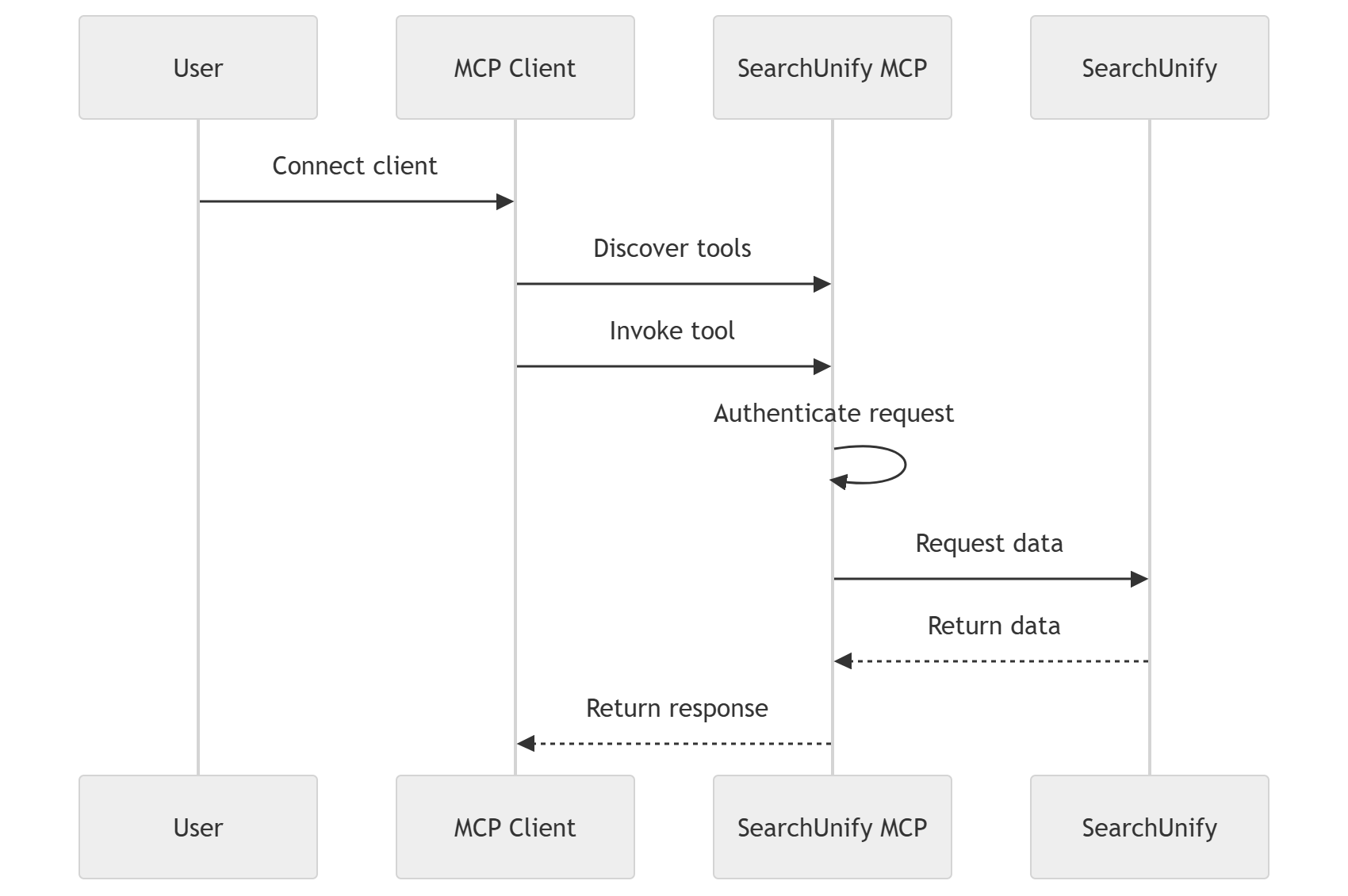
How SearchUnify MCP Works
At a high level, SearchUnify MCP works as follows:
-
An admin or developer connects an MCP-compatible AI client to SearchUnify MCP.
-
The AI client discovers available SearchUnify MCP tools.
-
A user asks the AI assistant a question or gives an instruction.
-
The assistant invokes a SearchUnify MCP tool when SearchUnify context is required.
-
SearchUnify MCP authenticates the request.
-
SearchUnify returns search results, filter options, or analytics data.
-
The AI assistant uses the returned data to respond to the user.
Available Tools
SearchUnify MCP exposes core tools for search, filtering, analytics, and search client discovery. The login tool is available only through the /mcp-connect endpoint.
| Tool | Purpose |
| search |
Searches SearchUnify-indexed content |
|
get-filter-options |
Retrieves available filter values for a query |
| analytics |
Retrieves SearchUnify analytics reports |
|
get-search-clients |
Lists available SearchUnify search clients |
| login |
Starts the tool-based login flow through /mcp-connect |