

True Stage 1 Case Deflection
True Stage 1 Case Deflection is calculated by a complex formula which takes into account multiple variables, including the total clicks on search results, total sessions in which the users contacted support, and total cases created in the past 24 hours.
Prerequisites:
Activate True Deflection in Search Clients > Edit > Analytics Settings > Analytics Properties > Select any type of implicit deflection.
View True Stage 1 Case Deflection
-
Navigate to Analytics > Search Analytics > Conversions > Search Analytics Overview.
-
To view the numbers for Stage 1 Case Deflection from Search, click Case Deflection.
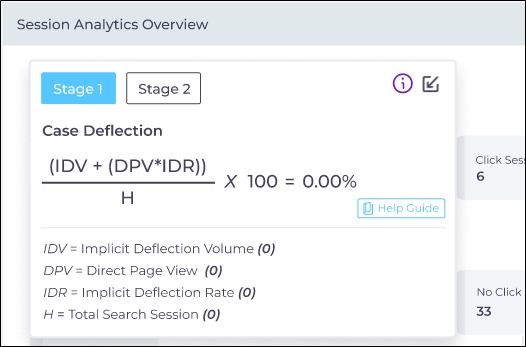
Stage 1 True Case Deflection Terminology
The key terms to understand True Deflection and its impact on Stage 1 case deflection.
-
Viable Search Visits with Clicks (VSV)
-
Self-Service Success Rate (SSSR)
-
Useful Search Visits (USV)
-
Self-Solve Volume (SSV)
-
Implicit Deflection Rate (IDR)
-
Implicit Deflection Volume (IDV)
Each term is defined in next.
Viable Search Visits with Clicks (VSV)
Viable Search Visits with Clicks (VSV) is the number of total sessions in which users clicked on search results and found them useful.
The formula is:  , where
-
Total Clicks is the sum of all the clicks in all the sessions on a selected search client in the given time period.
-
Unuseful Clicks is the sum of "No" and "Too early to comment" responses on a search results page. On the search results page, users can rate search results by selecting "Yes," "No," or "Too early to comment."
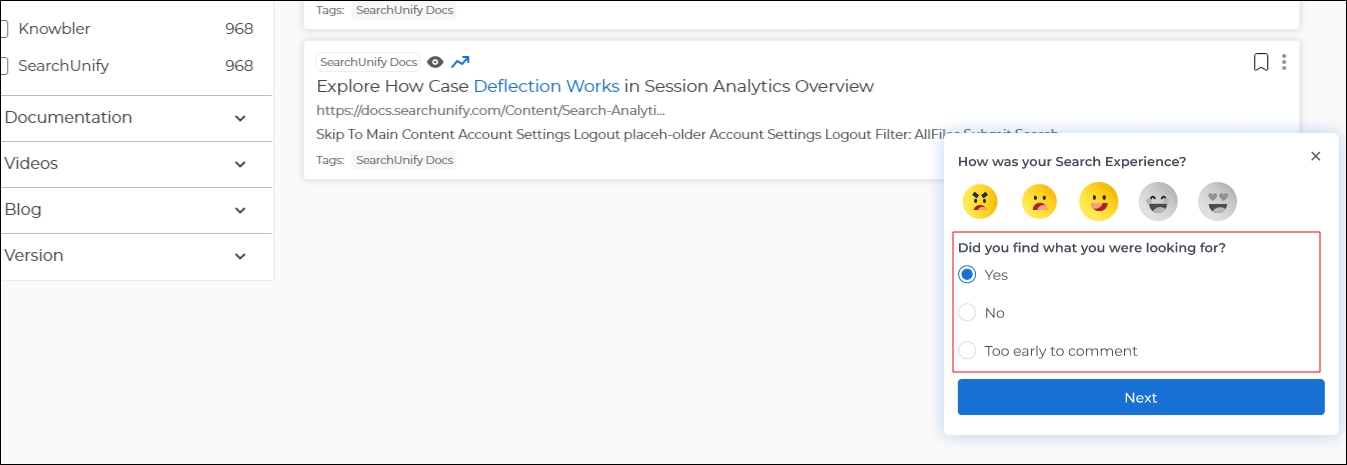
Fig. A snapshot of the feedback widget where a user can rate the relevancy of search results.
Self-Service Success Rate (SSSR)
Self-Service Success Rate (SSSR) is the ratio of useful answers to the total number of answers.
The formula is  , where
-
Total Answers is the sum of all user responses on the search results page. On each search results page, the users can rate search results by selecting "Yes," "No," or "Too early to comment."
-
Useful Answers is the sum of all "Yes" responses from the users on the search results page. On each search results page, the users can rate search results by selecting "Yes," "No," or "Too early to comment."
Fig. A snapshot of the feedback widget where a user can rate the relevancy of search results.
Useful Search Visits (USV)
Useful Search Visits is obtained by multiplying Viable Search Visits with Clicks (VSV) with Self-Service Success Rate (SSSR)
The formula is 
Self-Solve Volume (SSV)
Self-Solve Volume is obtained substracting the cases created in the past 24 hours from the user search visits (USV).
The formula is 
Implicit Deflection Rate (IDR)
Implicit Deflection Rate is the ratio of users who would have contacted support if their issues weren't resolved.
The formula is  , where
-
Contact Support is the total number of cases created in a given time period.
-
Total Responses is the sum of all user responses on the search results page. On each search results page, the users can rate search results by selecting "Yes," "No," or "Too early to comment."
Implicit Deflection Volume (IDV)
Implicit Deflection Volume (IDV) is obtained by multiplying Self-Solve Volume with Implicit Deflection Rate.
The formula is  .
.