

Release Notes: SearchUnify Q3 '26
We’re excited to announce the Q3 ’26 release, which brings several changes in SearchUnify and Agent Suite.
The key highlights of this release include:
-
Search query clustering has been added to Click Boosting
-
Search queries are rephrased after identifying their context
-
Support for regex-based keywords comes to Advertisements
-
Anthropic is now supported in LLMs
-
More control is now offered in predicting escalations in AI Escalation Manager
-
Multi-Agent Scoring now works in Case Quality Auditor
Cognitive Search
Clustering Introduced in Click Boosting
The working of Click Boosting Base has been updated. When Click Boosting Base is enabled, search queries are clustered based on intent. For example, "install SearchUnify on Salesforce Console," "how to install SearchUnify on Salesforce Console," and "SearchUnify Salesforce Console install" are grouped into a single cluster. Based on this clustering, the system finds up to two most clicked, relevance-weighted documents.
Note: Documents are boosted only when SearchUnify is highly confident in their user intent and the relevance of the boosted documents. Otherwise, they are not boosted. The intent is found through an analysis of synonyms, aliases, partial matches, and lemmatized words. The exact relevance threshold can be configured in consultation with the SearchUnify team.
Once Include Clicks from All Search Clients is enabled, search queries from all search clients are clustered together. You can change this behavior by unchecking it. You can use the ML Score Multiplier to increase or decrease the likelihood of boosted documents appearing in search results.
The impact of Click Boosting Base can be viewed in Test Your Tuning. For example, in the next image, Click Boosting has increased the rank of a result by five positions. Its rank without tuning was six and after tuning it’s one.
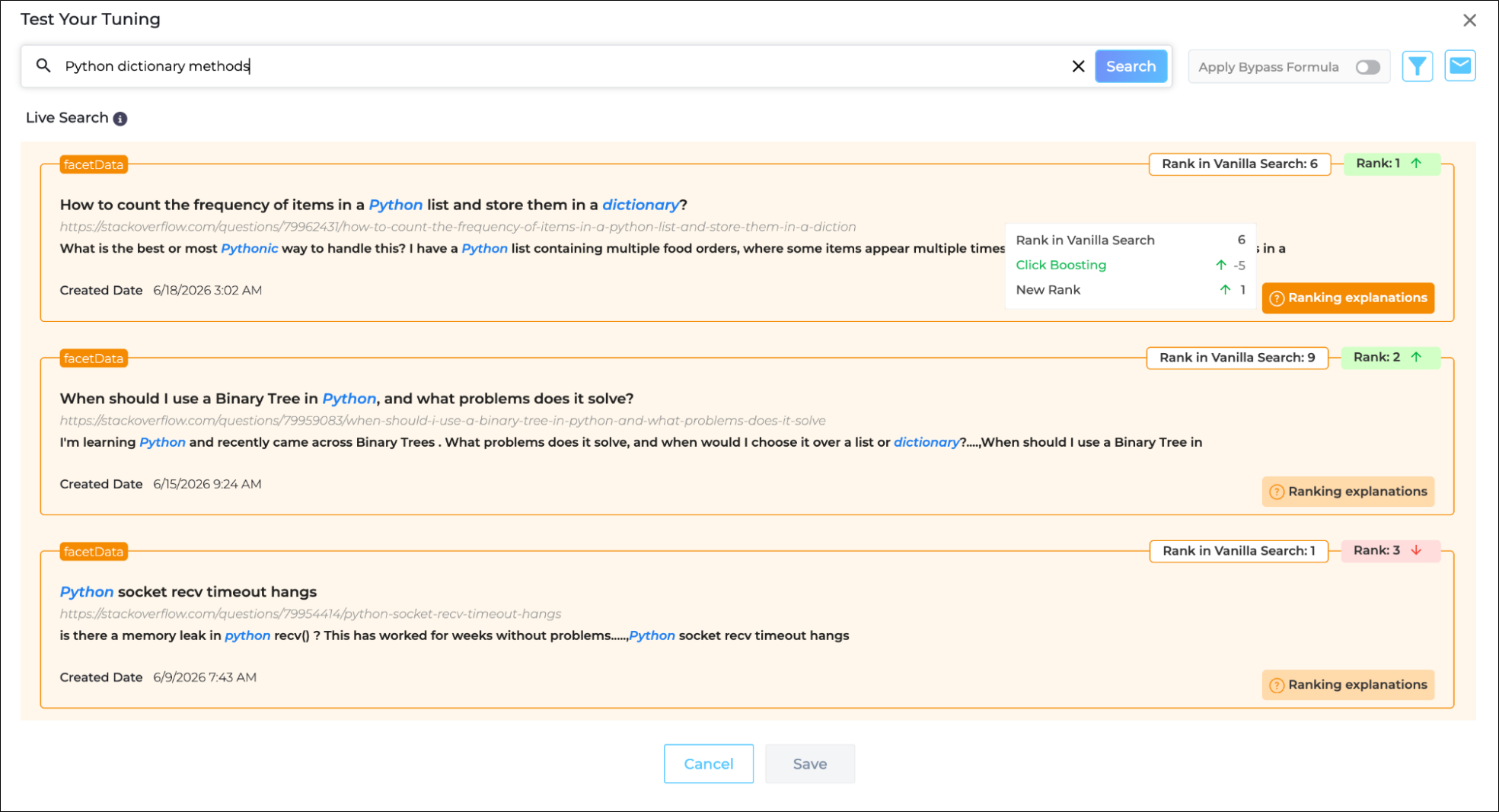
Fig. A snapshot of the impact of Click Boosting Rate in Test Your Tuning.
More information: Click Boosting Rate
Improved Facet Interpretation
When Enable Facet Interpreter is configured and active, SearchUnify automatically boosts the facet when a search query matches a facet value. For example, if a user searches for "searchunify" and "SearchUnify" is a value in the Products field, the Products facet is automatically boosted. All the results from this facet are then shown in the results, providing the user with more and more relevant options.
With this release, Facet Interpretation has been upgraded. A query no longer needs to exactly match a facet value for the facet to be applied. By utilizing synonyms and other features, SearchUnify can better identify the intent of a search query, resulting in a 10–12% improvement in facet interpretation and result relevance.
Context-Aware Query Rephrasing
SearchUnify Search now better understands context and terminology specific to the customers while rephrasing search queries in the backend. The rephrasing functionality was introduced in the Q4 ‘25 release.
Previously, query rephrasing relied on a prompt common to all customers. That prompt could overlook organization-specific language and alter the intended meaning of queries. With this enhancement, rephrased queries align with each customer’s terminology and context.
This enhancement enables:
-
Better alignment with customer-specific language and context.
-
More accurate query rephrasing.
-
Improved search relevance and intent matching.
Run Advanced Searches “With All the Words”
The Advanced Search form on search clients now includes a new field: "With all the Words."
A query entered in this field returns only documents that contain all the entered words, regardless of the word order. For example, "search client analytics" returns documents that contain the words "search," "client," and "analytics.”
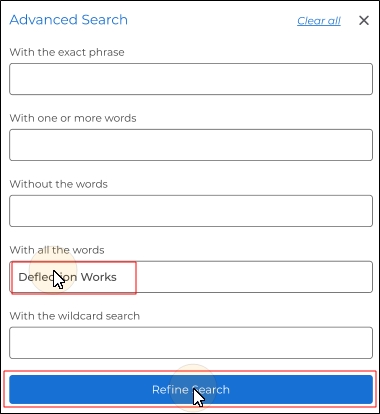
Fig. A snapshot of a “With all the words” field in Advanced Search.
More information: Advanced Search Form
Multi-Keyword & Regex Support for Advertisements
Previously, you could run only one ad on a keyword. If you wanted the same ad on another keyword, then you had to create another ad. By providing support for multiple keywords and regex patterns on a single ad, this release makes ad creation more efficient.
To create an ad for multiple keywords and regex patterns, go to Search Clients > Edit > Advertisements. Enter regex patterns or comma-separated keywords and patterns for triggering the ad in the Search Phrases box and create your ad in the Edit Advertisement HTML box.
Now the ad will be shown each time users search one of the keywords that you’ve entered, or each time the user query matches the regex pattern entered in the left box.
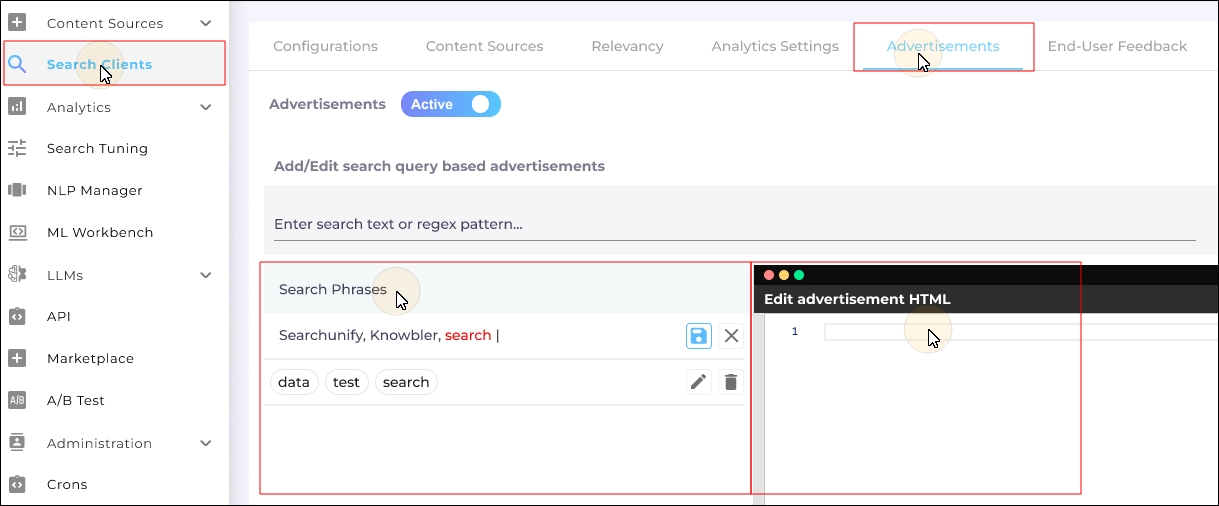
Fig. A snapshot of ad creation in Advertisements.
This update reduces the administrative overhead of managing ads. By consolidating ad triggers, supporting advanced regex matching, and offering a cleaner UI for managing search phrases, admins can streamline their ad configurations and spend less time duplicating banners.
More information: Run Advertisement(s) on Your Search Clients
Attach and Share Articles from Saved Bookmarks and Results in Salesforce Console
The Saved Results option in the Salesforce Console now features the article attach and share functions available on the search results page on Salesforce Console. Along with the Preview Article and Copy to Clipboard buttons, you will see a dropdown menu with three new options:
-
Attach to Case
-
Send Link as Case Comment
-
Send Link via Email
This improvement will help agents work faster by letting them attach and share articles right from inside Saved Bookmarks and Results. Earlier the agents had to find the articles on the search results again to share them. They could share articles from the search results page if the Share Articles feature had been activated.
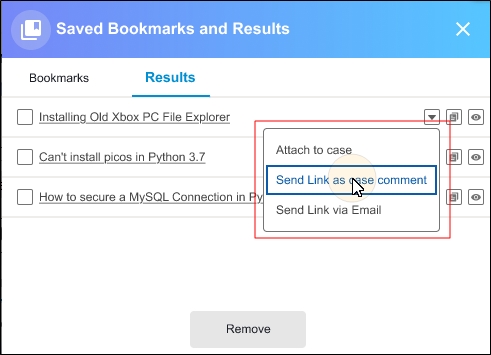
Fig. A snapshot of the Attach and Share functions in Saved Bookmarks and Results in Salesforce Console.
More information: Saved Results
View the Time When Users Share Feedback on SearchUnifyGPT Responses
A Date Time column has been added to the SearchUnifyGPT Feedback Report to capture when a user shared feedback on a response generated by SearchUnifyGPT. The time is recorded in the YYYY-MM-DD HH:MM:SS format (for example, 2026-05-20 15:38:02 indicates feedback shared on May 20, 2026, at 15:38:02). This column is sortable, allowing you to view the latest or oldest feedback for any search client and date range.
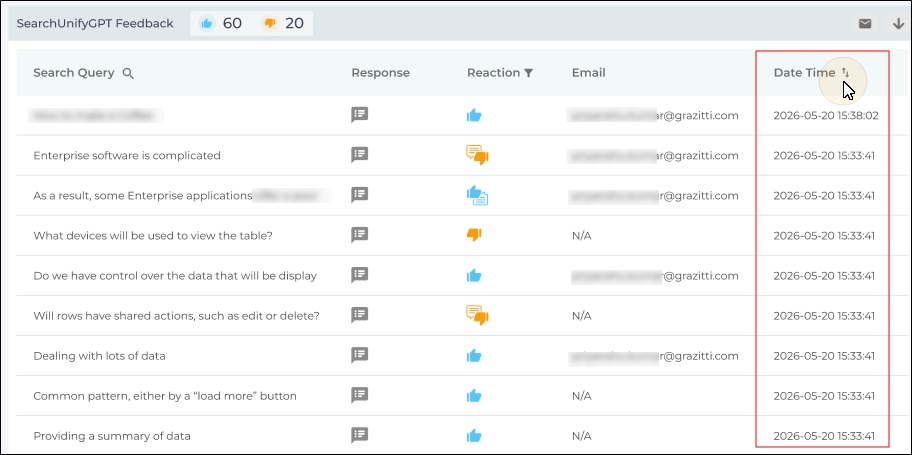
Fig. A snapshot of the SearchUnifyGPT Feedback report with the Date Time column.
More information: SearchUnifyGPT Feedback Report
Support for Anthropic Introduced in Bring Your Own LLM
Anthropic becomes the fifth LLM supported in Bring Your Own LLM in LLM Integrations. You can now use Anthropic to summarize results and provide generative responses on SearchUnifyGPT. To use it, insert the Anthropic API key, click Connect, and activate the connection.
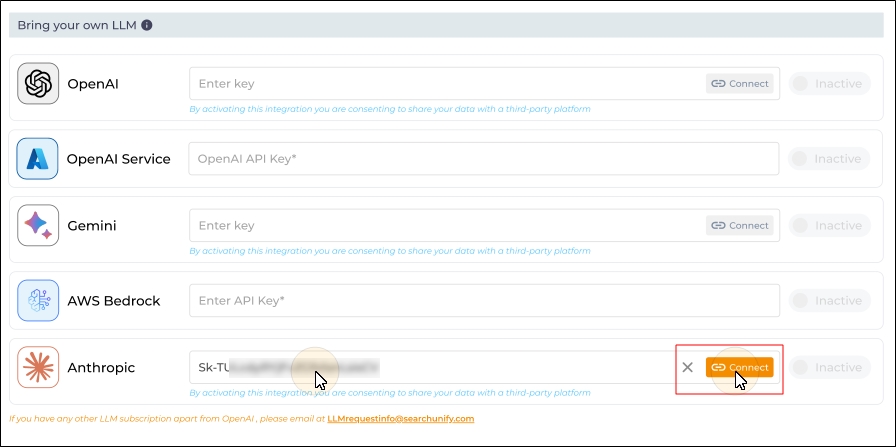
Fig. A snapshot of Anthropic activation.
The Anthropic token usage is captured in the LLM Usage Insights reports.
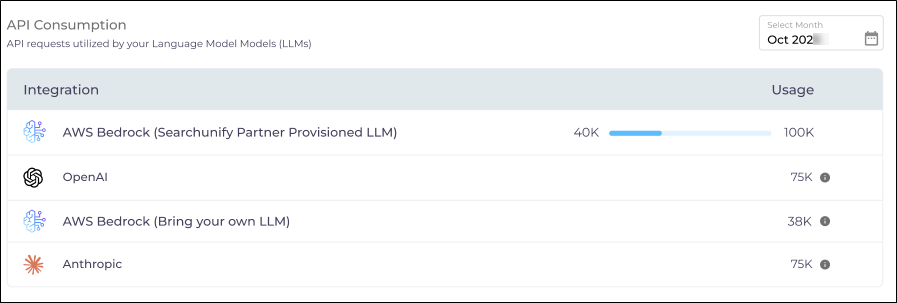
Fig. A snapshot of the API Consumption report in LLM Usage Insights.
More information: LLM Integrations and LLM Usage Insights
“Last Active” Column Added to “User Role Management”
The Last Active column has been added to the Users list in User Role Management. The column displays the time of the user’s last recorded activity. A user is considered active when they perform an activity that is recorded in Security > Admin Logs.
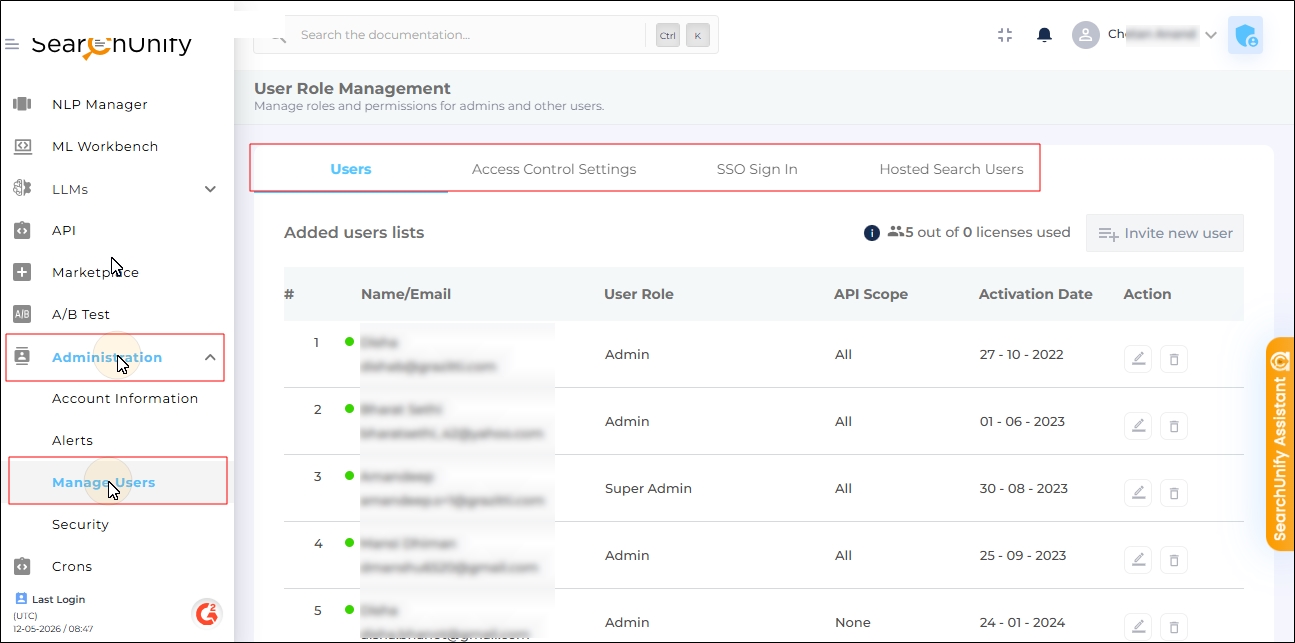
Fig. A snapshot of the Manage Users screen.
More information: Manage Users
AI Agent Partner
Introducing AI Agent Partner: The Agentic Evolution of Agent Helper
Agent Helper has evolved into AI Agent Partner, a smarter, agentic AI-powered support experience available as part of the Agentic AI Suite.
With this transition, the standalone Agent Helper product is deprecated and reintroduced as AI Agent Partner, bringing its support-assistance capabilities into an agentic framework designed to work alongside support agents throughout the case-resolution journey.
AI Agent Partner uses the context of the active case to help agents understand issues, generate and refine customer responses, surface relevant knowledge, assess sentiment and escalation risk, recommend experts for collaboration, and take supported case actions—all within their existing support workflow.
By bringing these capabilities together through an agentic experience, AI Agent Partner helps reduce manual effort and context switching while enabling agents to make faster, more informed decisions during case resolution.
AI Escalation Manager
Greater Control over Factors that Predict Escalations in AI Escalation Manager
AI Escalation Manager now includes an advanced configuration that gives admins greater control over how escalation risk is calculated and how teams are notified when the thresholds are breached. This enhancement helps organizations align escalation prediction behavior with their risk tolerance and response workflows.
Admins can now configure weighted scoring across five parameters:
-
Sentiment
-
Severity
-
Complexity
-
Response SLA
-
Resolution SLA
The configuration enforces validation rules such as a total enabled weight of 100 percent and a minimum Sentiment weight of 15 percent, ensuring scoring remains consistent and meaningful.
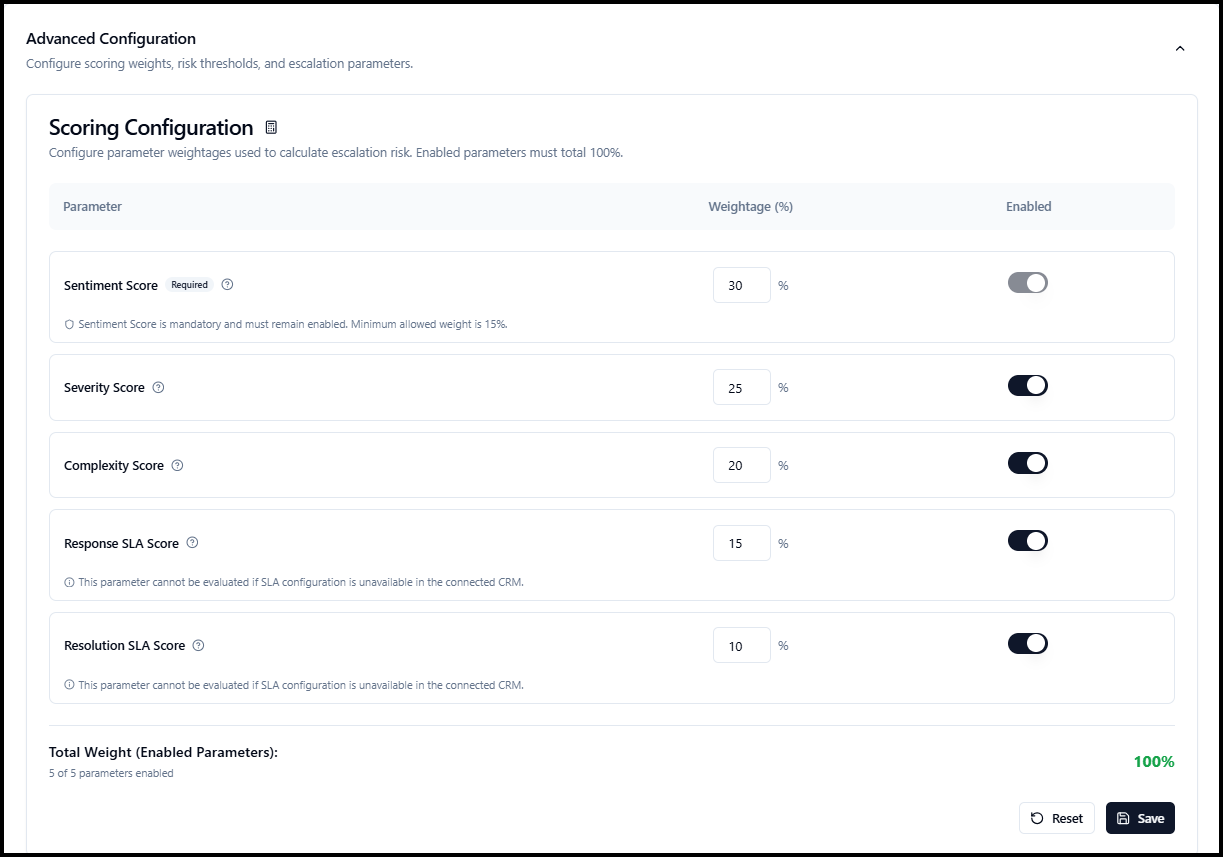
Fig. A snapshot of the five escalation parameters.
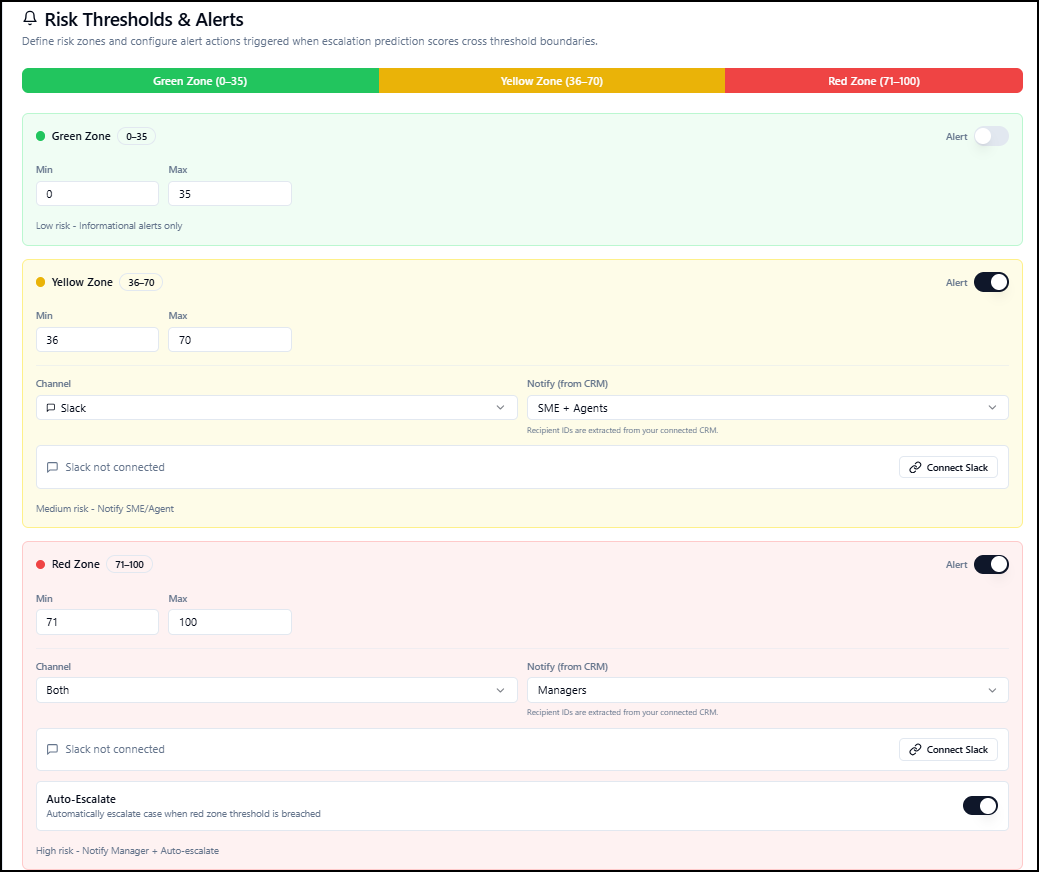
In addition, admins can define risk thresholds across Green, Yellow, and Red zones and configure alert behavior for each zone. Alert rules support email, Slack, or both; allow recipients to be selected from CRM-derived roles; and include Slack connection management within the configuration flow.
For critical scenarios, the Red Zone supports auto-escalate, enabling high-risk cases to be escalated when configured conditions are met. This helps teams respond faster to urgent issues while reducing the risk of missing high-priority cases.
Case Quality Auditor
Multi-Agent Scoring for Case Quality Auditor
Case Quality Auditor now supports Multi-Agent Scoring for cases handled by multiple agents.
Scores, credits, and deductions are attributed to the agent who owned the case during the relevant ownership window, while activities from other agents can be used as supporting evidence.
Quality parameters are evaluated as Applicable, N/A, or Not Evaluated based on the available activity and evidence. Parameters marked N/A or Not Evaluated are excluded from the Agent QA Score.
This provides more accurate agent-level quality evaluation across cases that change ownership during their lifecycle.
Multi-Agent Case QA Email Notifications
Case Quality Auditor now supports multi-agent Case QA email notifications. After an audit is completed, each scored agent automatically receives a private email with their Agent QA Score, parameter-level feedback, and coaching recommendations, while mapped managers receive a case-level view with the overall Case QA Score and scores for all evaluated agents.
For cases with more than five scored agents, managers receive a summarized email with an option to download the full Multi-Agent QA report.
Unified Team and Agent Filtering for Agent Score Card
The Agent Score Card tab in the Case Quality Auditor Analytics now provides consistent Team and Agent filtering across the complete Agent Performance view. Managers can analyze performance for an entire team, a specific agent, or compare up to four agents at a time.
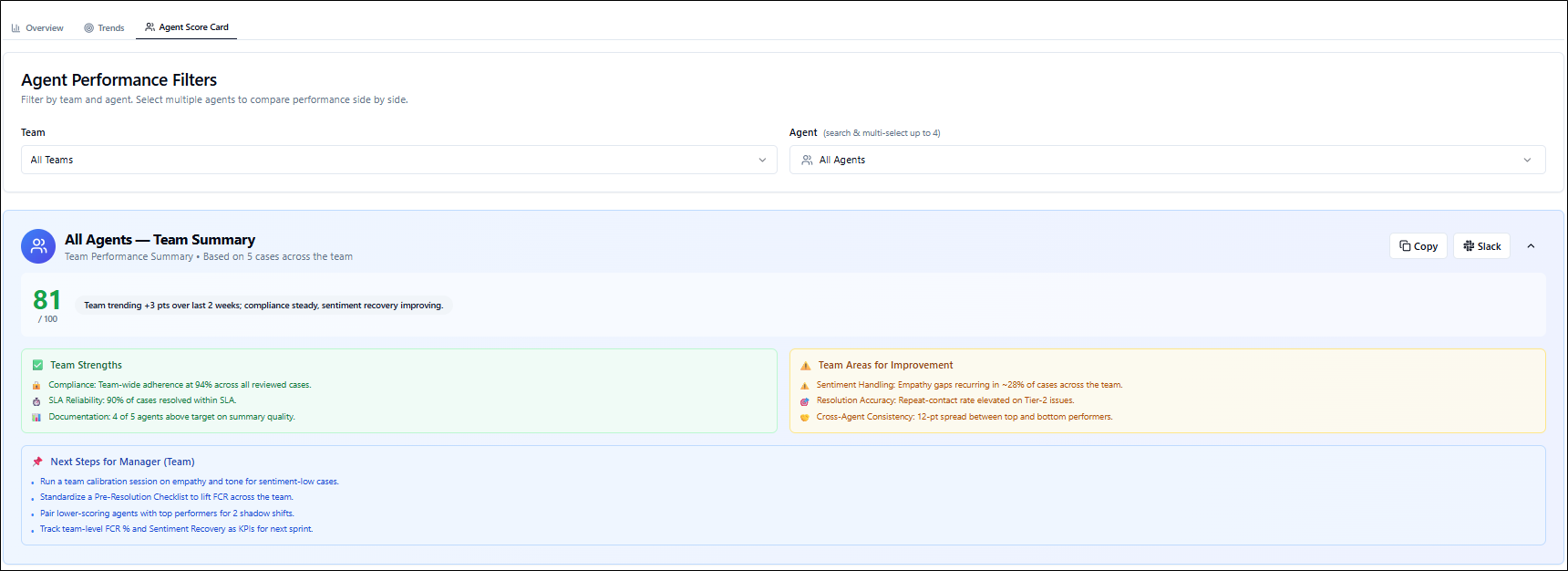
The selected filters now update the Agent Performance Summary, score cards, parameter-level analytics, trend charts, and case-level reports together, ensuring that strengths, areas for improvement, and recommended next steps always reflect the selected team or agents.
Introducing Audit Logging for Enhanced Security and Compliance
Agentic Platform now supports audit logging for critical user and system activities, including agent changes, configuration updates, permission changes, and authentication events.
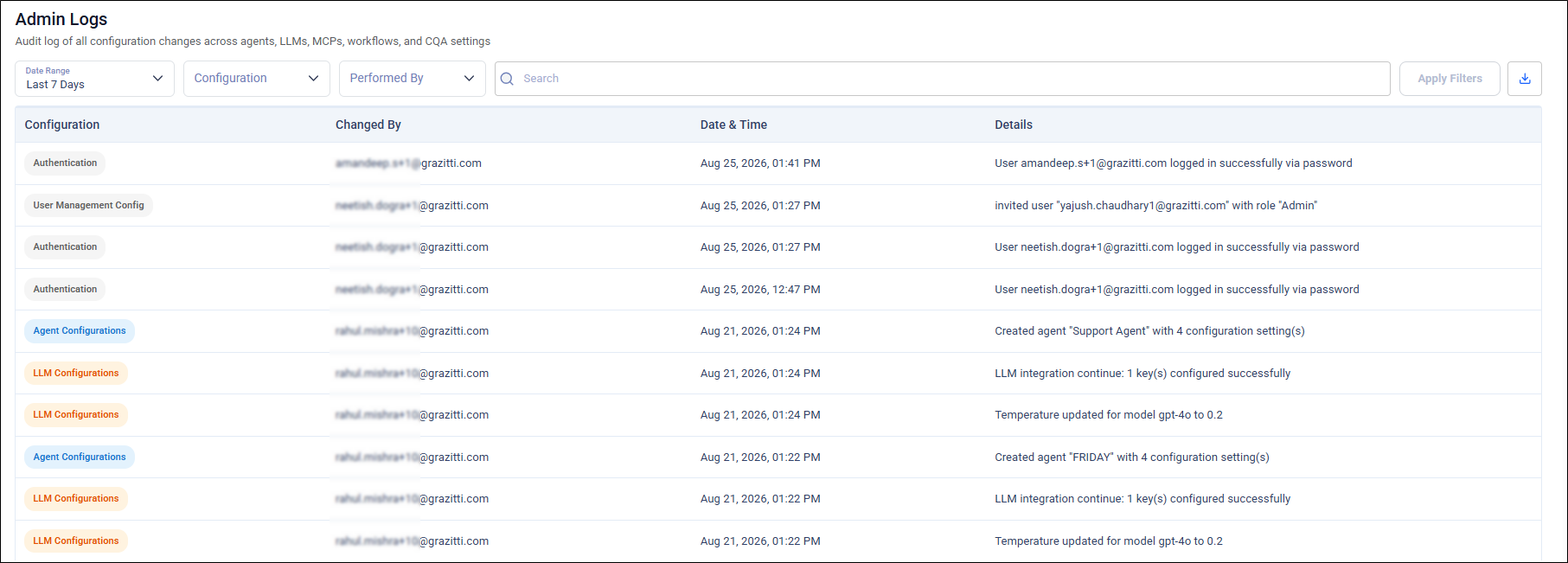
Audit logs capture key event details and outcomes in a searchable format while excluding sensitive information, helping improve security, compliance, and operational traceability.
Expand LLM Model Choice with AWS Bedrock and Azure OpenAI
Agentic AI Suite admin panel now supports AWS Bedrock and Azure OpenAI as LLM providers.
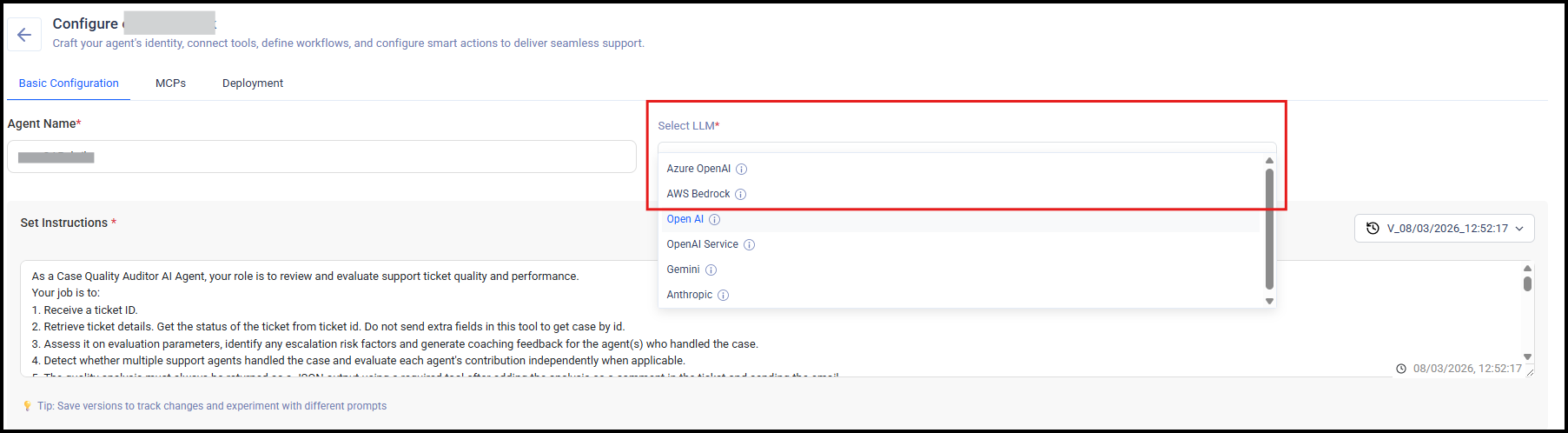
You can configure either provider, select supported models, and use them with your agents. The new providers give organizations greater flexibility to align AI deployments with their preferred cloud and model infrastructure.
Bug Fixes
-
Email notifications are sent for keyword and analytics subscriptions. Several users reported that they did not receive email notifications for content source subscriptions. No email was sent for content source subscriptions. This issue has been fixed. Users who subscribe to keyword or analytics notifications will receive the corresponding email notifications.
-
UI inconsistencies in Search Analytics have been removed. The tooltip on the "Sessions with unsuccessful searches" report didn’t display correctly. The tooltip content was partially cut off, causing the metric name and value to be unreadable. That bug has been fixed.
-
The Select Section menu in Admin Logs no longer shows duplicate values. Some sections were displayed more than once in the menu.
-
No more delay in the counting Claude token usage in LLM Usage Insights. A delay was caused by a function which has been removed.
-
Results per Page don’t change after Keyword Tuning. After applying tuning to any document, the number of displayed results often exceeded the number configured in the “Results per Page” setting. After this fix, Keyword Tuning will not clash with Results per Page.
-
No more accidental demos for Agent Helper. Each product now has a unique ID in the Marketplace. When a user requests an Agent Suite demo, no request for an Agent Helper demo is raised.