

Release Notes: SearchUnify Q4 '25
We’re excited to announce the Q4 ’25 release of SearchUnify, featuring new content sources, expanded in SearchUnify and Agent Helper, an expanded Marketplace, and customization configurations for the Agentic Suite.
Key highlights
-
Stack Overflow for Teams is now supported out of the box
-
Search Analytics Overview and Search Session Details reports display the impact of SearchUnifyGPT™ on case deflection
-
Marketplace has been expanded to include several new apps
-
Personalization options have been introduced in the Agentic Suite
-
Apps section is being deprecated; existing apps to move to retire or move to Marketplace
Content Sources
New Content Source: Stack Overflow for Teams
You can now make your Stack Overflow for Teams content searchable through SearchUnify. Stack Overflow for Teams is a secure, private Q&A platform that helps organizations share knowledge, improve collaboration, and reduce reliance on individual experts. It centralizes institutional knowledge so that it’s easily discoverable and accessible to team members.
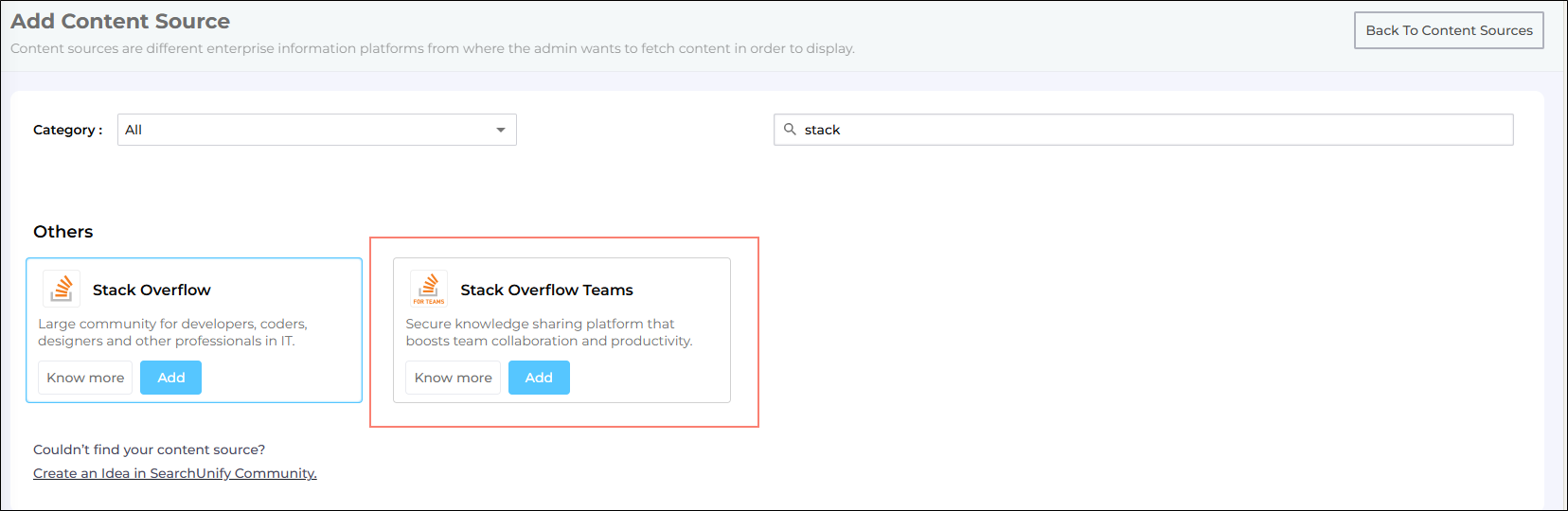
Fig. A snapshot of the Stack Overflow Teams content source.
More information: Use StackOverflow for Teams as a Content Source
Safer Token-Based Authentication for API Content Source
You can now authenticate the API content source using token-based authentication. Token-based authentication is safer than many other authentication methods, yet it provides all the functions SearchUnify needs to access your content source through API and index the data.
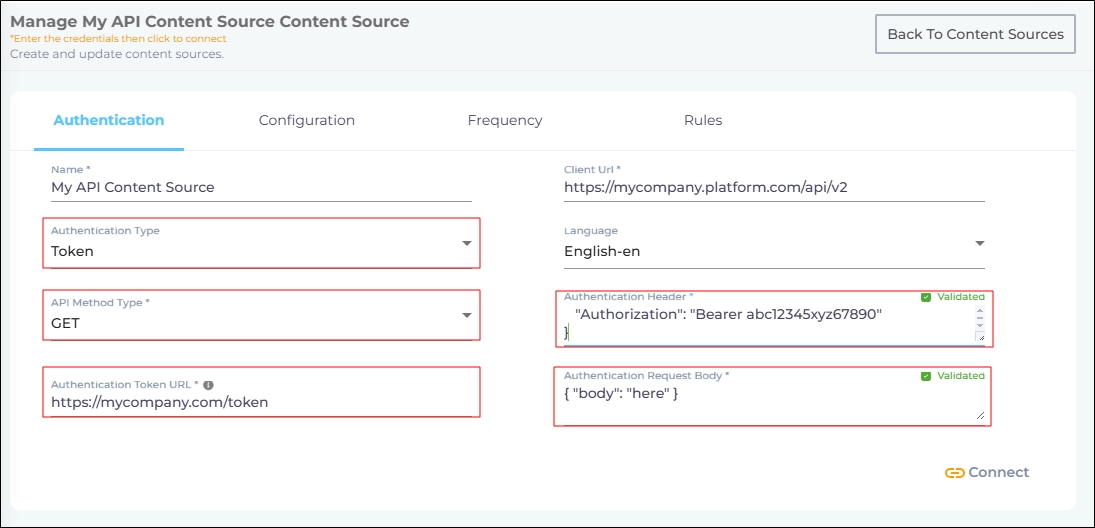
Fig. A snapshot of "Token" selected in the Authentication Type field for the API Content Source.
More information: Select an Authentication Method for the API Content Source
Index Websites Safely with .htaccess Files
.htaccess files allow changes to be made in the directories where they reside. You can use .htaccess files to configure access to the data stored on your website. This method is safe because the person using .htaccess files has access only to the directory where the .htaccess files reside, along with its subdirectories. Now the website content source supports authentication based on .htaccess files.
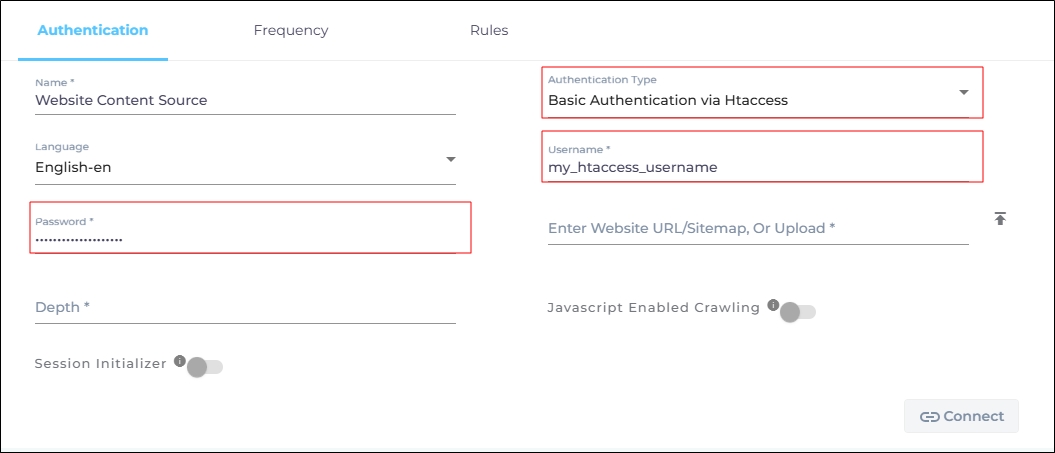
Fig. A snapshot of Htaccess via Basic Authentication method on a website content source.
More information: Select an Authentication Method for the Website Content Source
Search Clients
Select a Particular Model from Your Selected LLM
SearchUnifyGPT™ configuration flow has been enhanced to give admins finer control over their Gen AI setup.
When enabling SearchUnifyGPT™ or configuring Summarize Results, admins can now select both an LLM provider (e.g., OpenAI, Gemini, Claude) and a specific model (such as GPT-4.1 or GPT-5.1 for OpenAI).
The list of models dynamically updates based on the chosen provider and your API key. SearchUnify validates model availability against the configured API key. The success is indicated with a green tick and the issues with a warning icon and tooltip.

Fig. A snapshot of model selection for SearchUnifyGPT™ .
More information: SearchUnifyGPT™ and Summarize Results
Search Analytics
New Right-Click Menu on Search Pages
A new menu has been introduced on the search results page for all search clients, except the Salesforce Console search client. To access it, right-click (on a computer) or long press (on a mobile) and you will see the following options:
-
 Open
link in new tab: Opens the search result in a new
browser tab. Opening a link in a new tab counts as a
stage-one conversion and is recorded in the Search Analytics reports.
Open
link in new tab: Opens the search result in a new
browser tab. Opening a link in a new tab counts as a
stage-one conversion and is recorded in the Search Analytics reports.
-
 Open
link in new window: Opens the search result in a new
browser window. Opening a link in a new window counts as a
stage-one conversion and is recorded in the Search Analytics reports.
Open
link in new window: Opens the search result in a new
browser window. Opening a link in a new window counts as a
stage-one conversion and is recorded in the Search Analytics reports.
-
 Preview
article: Opens a preview of the article. This option
is visible only if the Preview function is enabled. To learn
more, see Preview Search
Results.
Preview
article: Opens a preview of the article. This option
is visible only if the Preview function is enabled. To learn
more, see Preview Search
Results.
-
 Summarize
results: Displays a summary of the text contained in
the search result. This option is visible only if the
Summarize function is enabled. To learn more, see Summarize
Results.
Summarize
results: Displays a summary of the text contained in
the search result. This option is visible only if the
Summarize function is enabled. To learn more, see Summarize
Results.
-
 Save
result: Bookmarks the search result for quick access
later. For more information, see Save Search Criteria
and Queries in Bookmarks .
Save
result: Bookmarks the search result for quick access
later. For more information, see Save Search Criteria
and Queries in Bookmarks .
-
 Copy
link address: Copies the link address to your
clipboard.
Copy
link address: Copies the link address to your
clipboard.
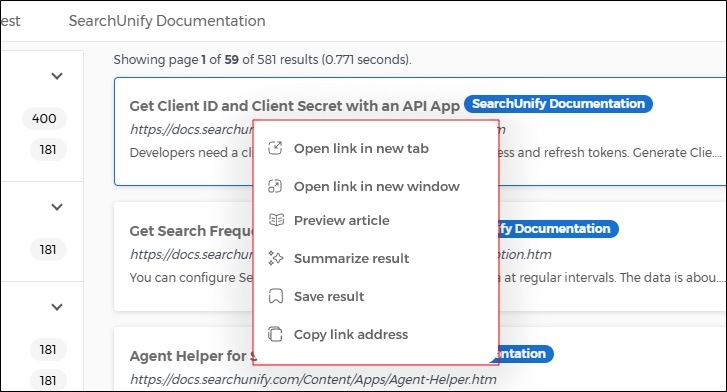
Fig. A snapshot of the right-click menu from the search results page.
More information: Right-Click Options
View the Impact of SearchUnifyGPT™ on Deflection in Analytics Reports
A new, analytics-driven framework has been introduced to measure the impact of SearchUnifyGPT™ on case deflection. With this release, Session Analytics Overview and Session Tracking – Details reports now provide granular visibility into AI-driven self-service through new session classifications (e.g., Answer Generated, Read Answer, No Answer Generated).
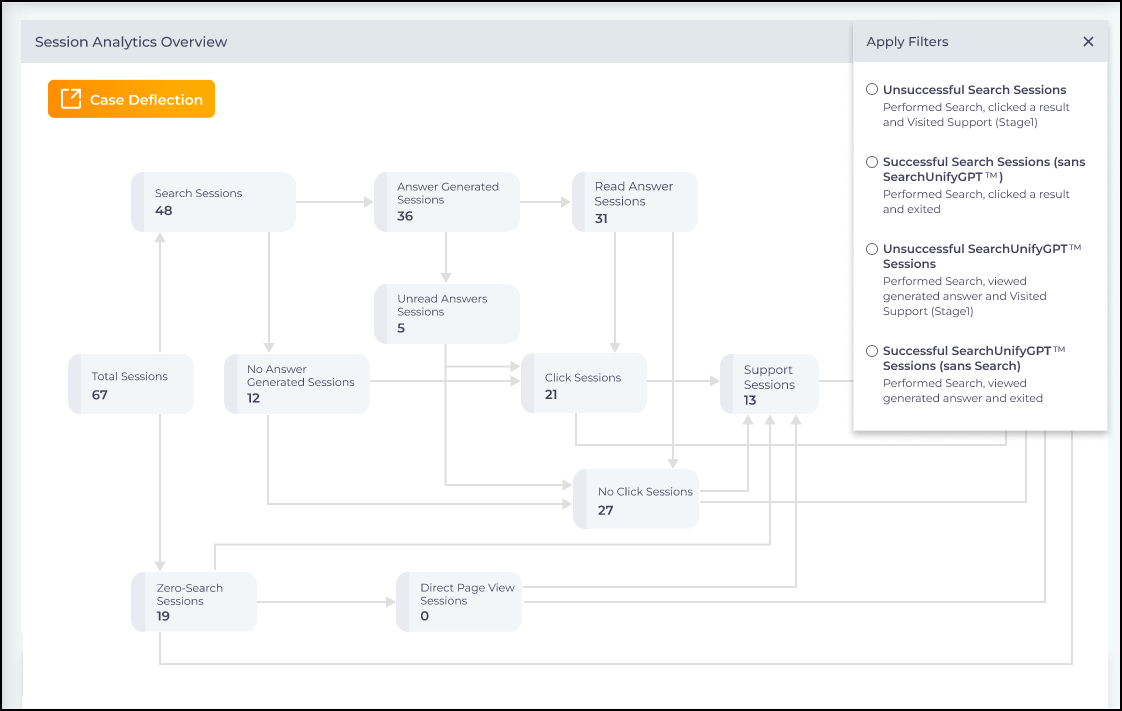
Fig. A snapshot of the Session Analytics Overview report with data on deflection from SearchUnifyGPT™ .
At the session level, the Session Tracking – Details report now includes a dedicated “Read Answer” filter and SearchUnifyGPT™ -specific filters, ensuring that any filter applied in the overview is automatically reflected in the detailed view. These enhancements enable teams to accurately quantify SearchUnifyGPT™’s contribution to case deflection, demonstrate ROI, and identify targeted opportunities to optimize AI and search experiences.
More information: Stage 1 Case Deflection from Search and SearchUnifyGPT™ and Session Tracking – Details
Marketplace
Apps Are Passé, Use the Expanded Marketplace Now
The Apps section will sunset after this release. The following table summarizes the changes that will take place after the Q4 ‘25 release:
| App or Product | Changes after the Q4 ‘25 Release |
| Case Deflection | Always available in Search Clients > Edit > Analytics Setting > Support Page URL; you don’t have to install an app to use it |
| Email Tracking | Always available in Search Clients > Edit > Analytics Settings > Email Tracking Enabled; you don’t have to install an app to use it |
| Knowledge Graph | Moved to Search Clients > Edit > Configurations > Knowledge Graph |
| Community Helper | Retired; no longer available |
| Duplicacy Checker | Retired; no longer available |
| Agent Helper | Moved to Marketplace > Agent Helper |
| Escalation Predictor | Now a part of Agent Helper > Escalation Predictor |
| Agentic Suite | New product in Marketplace |
| Knowbler | Already in Marketplace |
| SUVA | Already in Marketplace |

Fig. A snapshot of Email Tracking. It was formerly an independent app. Now it’s a feature in Search Clients.
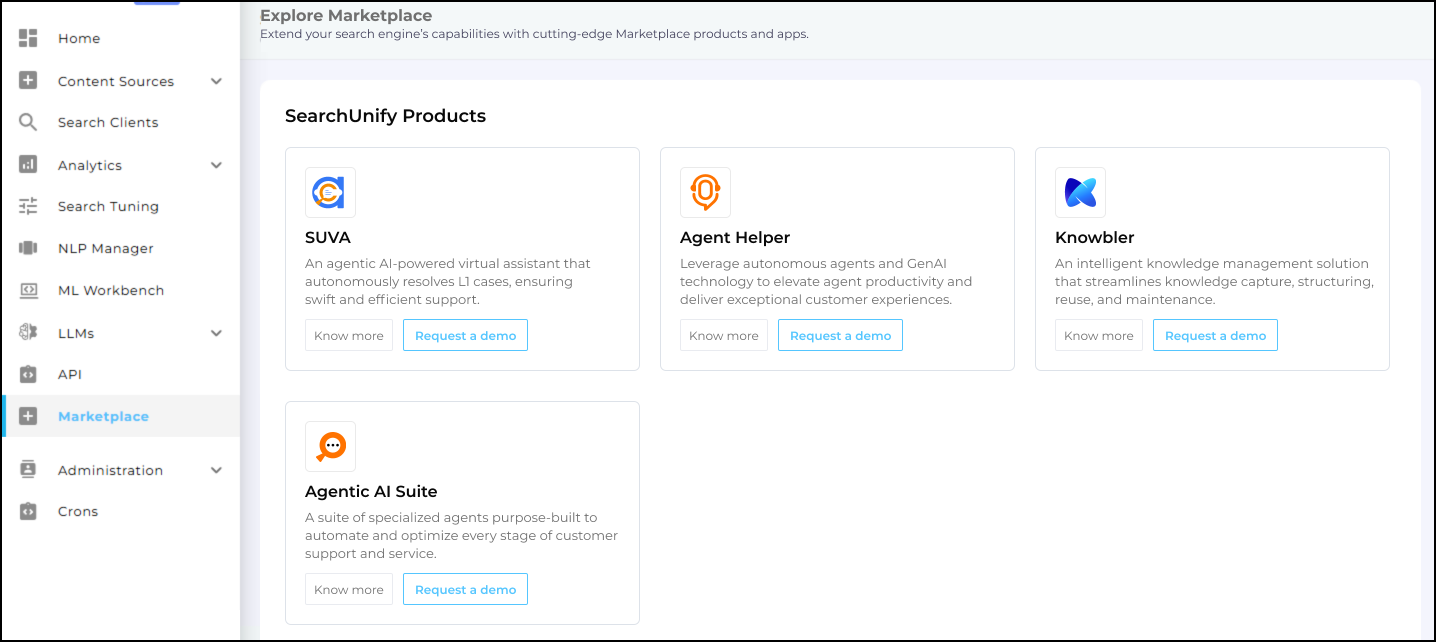
Fig. A snapshot of the Marketplace.
Agent Helper
New Features
Analytics Dashboard: New Overview Tab
The Agent Helper Analytics Dashboard now features a holistic Overview Tab. Support Leaders can view real-time KPIs in one place, including:
-
Total & Closed Cases
-
Average Time to Resolution (TTR)
-
Swarming Sessions Initiated
-
Response Assist Case Count

Fig: A snapshot of Agent Helper Overview screen.
Agent Engagement Report
Admins now have deeper visibility into tool adoption with the new Agent Engagement Report. This feature tracks agent usage health over time using four key metrics:
-
Total: Overall active users.
-
New: First-time users within the selected period.
-
Repeat: Returning users who consistently engage with the tool.
-
Lost: Users who have stopped engaging.

Fig: An illustration of the Agent Engagement Report in SearchUnify Admin Panel.
These insights empower Support Leaders to measure adoption effectiveness and identify opportunities for re-engagement.
Response Assist Adoption Metrics
Available in: Analytics > Agent Helper Analytics > Adoption Report (Filter by: Response Assist)
A dedicated report has been added to track usage of the Response Assist feature. Leaders can now quantify the value of AI-assisted responses, identify training gaps, and optimize feature utilization across their teams.

Fig: A snapshot of Response Assist Adoption Metrics analytics section on the Adoption tab.
Intelligent Swarming via Slack (Zendesk)
Available in: Agent Helper > Actions > Top Experts
Originally introduced in the Q2 '25 release for Salesforce, the ability to share case details directly to Slack is now available for Zendesk users. Agents can seamlessly share case context with individual subject matter experts (SMEs) via Slack, streamlining collaboration and accelerating resolution times.
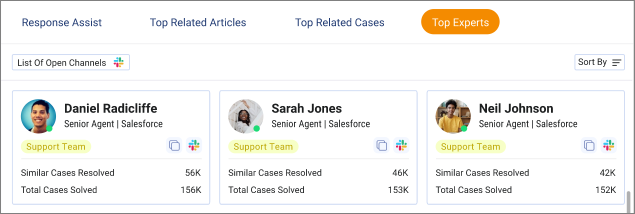
Fig: A snapshot showing the slack button for every agent profile.
Jira Integration for Response Assist
Available in: Response Assist
Agent Helper now integrates directly with Jira to ground AI-generated responses in live technical context.

Fig: Highlighted sections displays responses generated by Response Assist using data pulled from Jira.
When a JIRA ticket is linked to a case, Response Assist automatically uses the latest ticket updates made after the last reply to generate accurate, up-to-date responses. It reflects active progress while the ticket is open and provides a clear resolution summary once closed. If no JIRA ticket exists, the system follows the existing knowledge-based flow. Sensitive information is masked, and agents are prompted to review before sending.
This integration ensures support responses are accurate, up-to-date, and technically aligned with engineering status.
Enhancements
Response Assist: Regenerate & Compare (Zendesk)
Announced in the Q3 ’25 release, the Response Assist: Regenerate & Compare feature is now available for Agent Helper in Zendesk, expanding its functionality beyond Salesforce.
Agents using Zendesk can now regenerate up to four alternative responses for a single query, allowing agents to evaluate tone, clarity, and relevance, ensuring they select the highest-quality response before replying.
More information: Agent Helper Response Assist
Dynamic Language Detection & In-Ticket Translation (Zendesk)
Introduced in Q2 ’25, Dynamic Language Detection & In-Ticket Translation is now available for Zendesk as well.
Agent Helper now automatically detects a customer’s preferred language within Zendesk. Agents can translate drafted replies with a single click directly inside the ticket interface, eliminating context switching and improving multilingual support efficiency.
More information: Agent Helper Response Assist
Fullscreen Console Experience (Zendesk)
A new View Fullscreen (Open in new tab) button has been added to the Agent Helper Console in Zendesk. This allows agents to expand the interface to a new tab for fullscreen view for a focused, immersive workspace, making it easier to manage complex workflows without visual clutter.

Fig: A snapshot of showing View Fullscreen button in Agent Helper Console.
More information: Configure Agent Helper in Zendesk Support
Case Escalation Metrics for Zendesk
Available in: Analytics > Agent Helper Analytics > Agent Helper Adoption
The Case Escalation Metrics report, previously exclusive to Salesforce, is now supported for Zendesk deployments. This report helps teams analyze escalation trends to improve tier-one resolution rates.
Agentic Suite
Customize AI Agents Tab
A new AI Agents Designer Tab—inspired by SearchUnify’s Search Client Editor—has been introduced to help admins and developers customize the AI Support Agent for client-specific requirements. The tab offers an intuitive workspace to create, edit, and manage configuration files, generate builds, and automatically push all assets to the cloud frontend. This feature is built exclusively for the AI Support Agent and significantly simplifies configuration workflows while improving deployment flexibility.
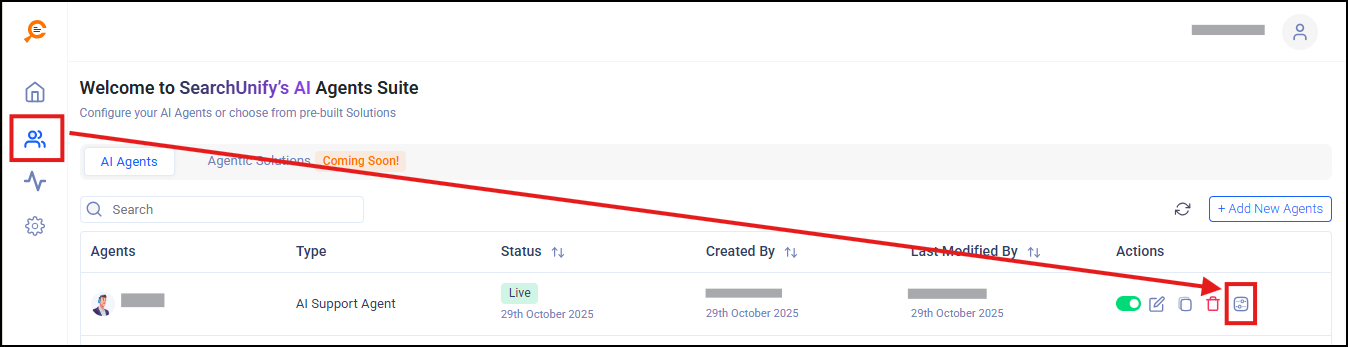
Fig: A snapshot highlighting the Customize AI Agent button in the Agentic Suite admin panel.
More information:
An Overview of the Customize AI Agent Window
Low Latency Voice Interaction
The Agentic Suite now supports low-latency voice interaction, enabling faster and more natural conversations with the AI Support Agent. Users can speak their queries using a new microphone control, and the system instantly converts speech to text with high accuracy.
The agent’s responses can also be delivered as audio through the new speaker option, supporting hands-free and accessible interactions. With multilingual support, natural-sounding audio, and robust fallback mechanisms, this enhancement provides a reliable and inclusive voice experience.
Other Updates
-
Branding Consistency. The frontend of the Salesforce Communities search client now looks and behaves like the other search client.
-
Improved User Experience with OTPs. Currently an OTP is required during each login. That changes with the current release. The OTP is now required only in the following scenarios:
-
User logs in from a new device or browser
-
User log in after changing or resetting their password
This logic applies to both existing tenants and new tenants.
-
-
Enhanced Search Relevance. New search client-specific Machine Learning (ML)-powered re-ranking algorithms have been implemented to improve the relevance of search results. Now the search clients:
-
Understand search intent better
-
Automatically expand search queries with contextually appropriate phrases to return relevant results
-
Provide tenant-level configurations over how the queries are rephrased
-
Known Issues
-
The handover status is updated in AI Support Agent even when the live agent connection fails.
-
Customer journeys are sometimes not tracked in platform-independent communities if multiple search clients are linked to the same account.
-
Knowbler pagination may show more pages than actually exist.
-
In Agentic Suite, users don't need to save the changes after deleting an MCP.