

Release Notes: SearchUnify Q2 '26
We’re excited to announce the Q2 ’26 release of SearchUnify, featuring smart analytics for Case Quality Auditor, consistent experience with a right-click menu on search clients, and dual-response generation in Response Assist.
The key highlights include:
-
Get the Crux of Case Quality Auditor Analytics in “Smart Insights Summary”
-
Model-Aware Temperature Configuration for LLM Integrations
-
“Agent Scorecard” to view team performance
-
Admin-configurable Case QA Scoring Prompts and Rules
-
Boolean Searches without the Hashtag (#)
-
LLM-Powered Result Filtering
Agentic AI Suite
Get the Crux of Case Quality Auditor Analytics in “Smart Insights Summary”
A Smart Insights Summary section introduced at the top of the Case Quality Auditor Analytics dashboard provides summaries of the analytics data into digestible bullet points. The summaries cover:
-
QA performance trends
-
SLA compliance shifts
-
Changes in agent or account risk
-
Emerging problem areas (compliance violations)
-
Suggested actions
The summaries are more than a diagnostic tool. The last bullet point in the summary is “Suggested Actions” which gives recommendations on what you can do to improve QA quality trendlines.
The goal of introducing these summaries is to help decision makers quickly understand QA performance, SLA compliance, and account risks without manually analyzing graphs and tables.
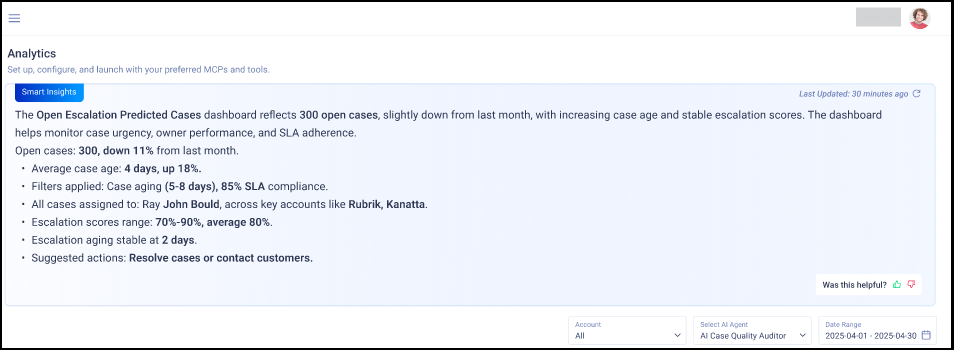
Fig. A snapshot of the Smart Insights Summary on top of the Case Quality Auditor Analytics dashboard.
More information: Case Quality Auditor Analytics
Model-Aware Temperature Configuration for LLM Integrations
Temperature is a core runtime control for balancing determinism against variability. With this update, you can configure Temperature for each key and model in LLM Integrations. Using temperature control configuration for each key-model pair, you can make responses from the LLM become more predictable and easy to debug.
-
To use the configuration, select a key and a model in LLM Integrations. The Temperature control appears after a model is selected.
-
Use the step (+ / -) controls to set a temperature. The range in Temperature control is model-aware and automatically enforces the limits supported by the selected model.
-
Click Continue to save the temperature.
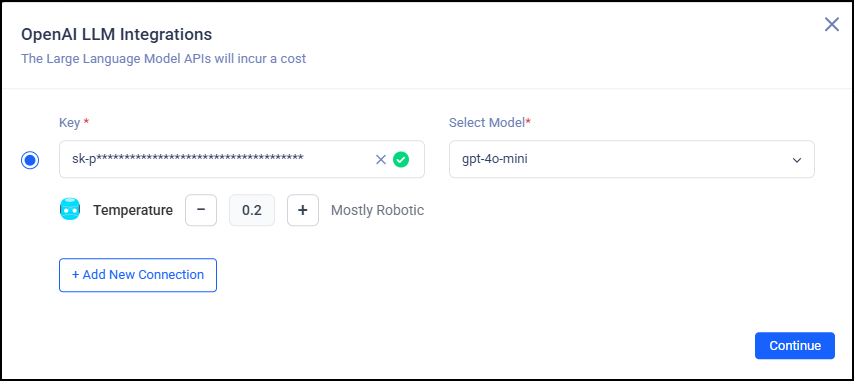
Fig. A snapshot of the Temperature control configuration in LLM Configurations.
More Information: Adding an Agent and Basic Configuration
AI SupportPlus Agent (New)
AI SupportPlus Agent adds an intelligent automation layer within your CRM or helpdesk to handle incoming cases across email, portal, and other channels. The key capabilities include:
-
Instant-first response automation with context awareness
-
Knowledge base-driven resolutions with citations
-
Multi-turn clarification and safe escalation
-
Audit trail with confidence signals and decision logs
AI SupportPlus Agent automates repetitive L1 work, accelerates first response times, and frees agents to focus on complex, high-value issues—while maintaining governance through auditability.
More Information: SearchUnify AI SupportPlus Agent and Deploying AI SupportPlus Agent: Install SearchUnify AI SupportPlus Agent in Salesforce Service Console
“Accounts at Risk” Added to Case Quality Auditor Analytics
The new Accounts at Risk in Case Quality Auditor Analytics report identifies customer accounts that may be at risk due to declining case quality or SLA performance. Using this report, the support and customer success teams can identify risk signals quickly, align case quality insights with customer health, and prioritize accounts that need intervention.
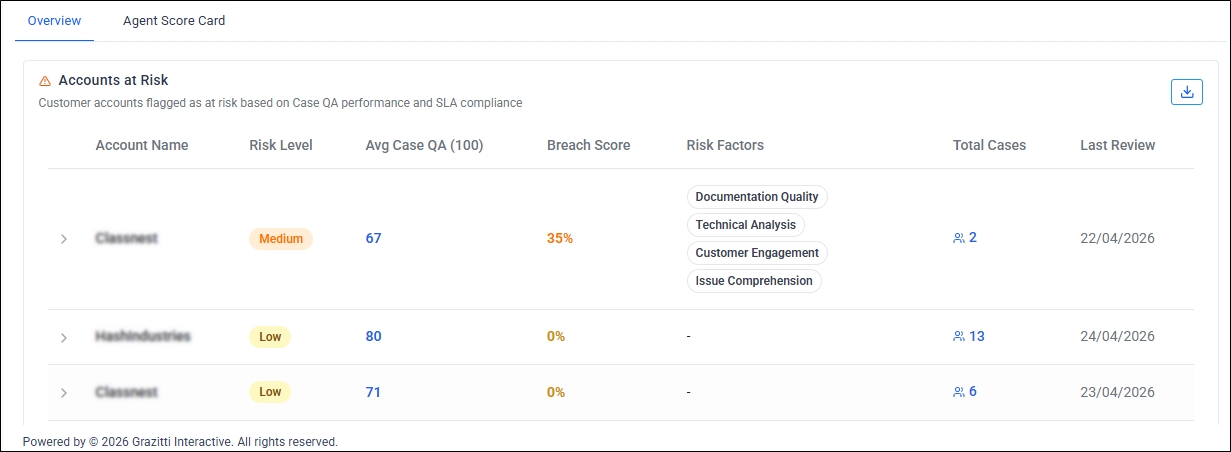
The admins can configure parameters to configure:
-
Conditions that indicate account risk
-
Score that is considered unacceptable performance
-
Contribution of each condition to the overall risk score
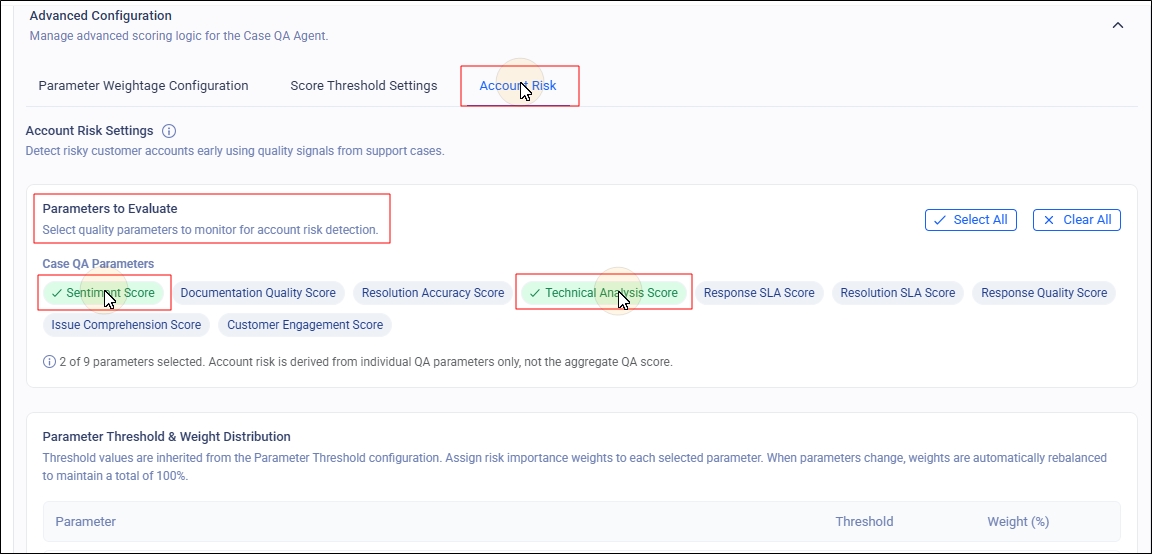
More information: Accounts at Risk Report and Accounts at Risk Configuration
Expandable AI Support Agent Widget with Sidebar
To make the AI Support Agent more accessible and engaging, and to offer a smooth experience across devices, a responsive floating widget has been added to it. It offers a compact chat overlay and a full overlay with sidebar navigation. The images next show them both.
A compact chat overlay

A full overlay with sidebar navigation

More Information: SearchUnify for AI Support Agent
AI Support Agent: Persistent Chat History and Conversation Memory
Chat history is now available for the AI Support Agent. The users can revisit and continue support conversations across sessions without losing context after an idle timeout, browser refresh, tab close, or return visit. The users can also
-
Search saved conversations by conversation title or associated case title
-
Rename or delete individual conversations
-
Clear chat history.
Text, images, and files remain available and are used to establish context when a conversation is resumed. On their side, the admins can configure how long the chat history is to be retained. The available periods are: 24 hours, 48 hours, and 72 hours (default).
To maintain a balance between context and accuracy, the AI Support Agent reuses context only when continuation rules allow. Chat history and context isn’t saved when a case discussion is marked as Resolved, escalated, handed-off, unsuccessful, or ended aren’t saved. start a new conversation instead of carrying previous context forward.
View Team Performance with “Agent Scorecard”
The Agent Score Card is a real-time, filterable dashboard for support managers that helps them view each agent’s performance, quality, and productivity. The dashboard is in Case Quality Auditor Analytics and it provides overall performance score and detailed performance breakdown by parameter. It also suggests the next course of action. Using this dashboard, the support agents and team managers can view their performance on select case quality parameters. Based on the scores, the team managers can implement targeted coaching and improve overall support outcomes.
More information: Agent Score Card
Admin-configurable Case QA Scoring Prompts and Rules
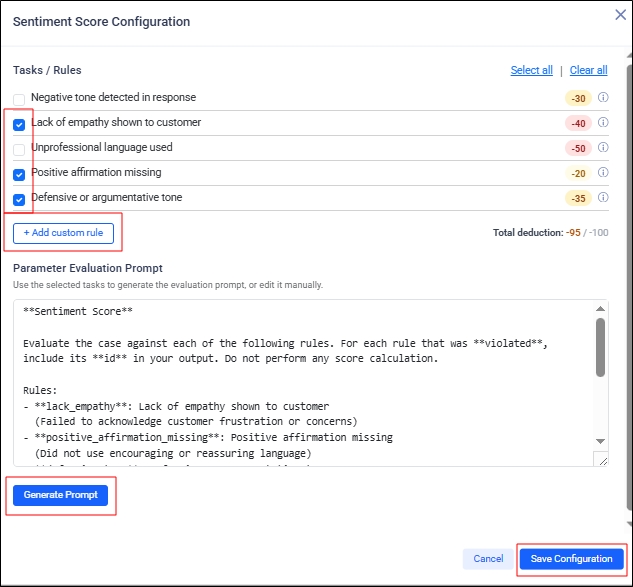
Admins can now configure Case QA evaluation tasks by parameter, including defining evaluation rules, controlling which quality failures apply per parameter, and specifying how deductions are calculated. In order to configure, click on the Settings icon against a parameter in Parameter Weightage Configuration.
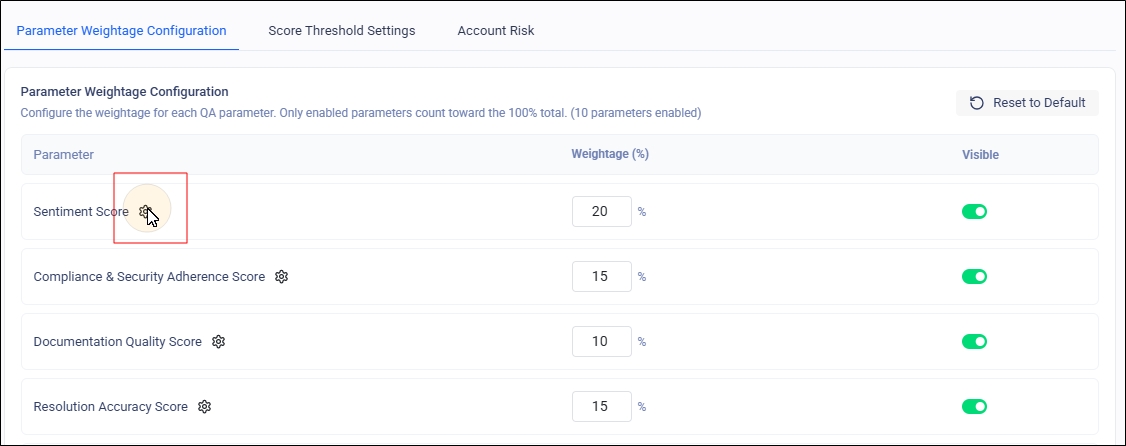
The system will display an editable LLM scoring prompt so the evaluation logic is transparent and customizable, ensuring Case QA scores are consistent, explainable, and aligned with organization-specific quality standards.
Core Search
Boolean Search Works without the Hashtag (#)
Boolean search works without the # character now. The use of a hashtag in a boolean search query is optional. After upgrading to this release, the search users will be able to run [search + client] or [# search + client] and receive the same results. The search clients are now smart enough to figure out when to interpret a search query as a boolean search query. Whenever the search client interprets a query as a boolean search query, a sign is displayed to the user on the search client UI. On their part, the admins can blacklist queries that should never be interpreted as boolean. Synonyms are ignored when a query without the hashtag is interpreted as boolean.
Boolean search works without the “#” character now. The hashtag in a boolean search query is optional. After upgrading to this release, search users can run “search + client” or “# search + client” and get the same results.
Search clients can now determine when to interpret a query as a boolean search query. When a search client interprets a query as a boolean query, it shows an indicator on the search client UI. Admins can blacklist queries that should never be interpreted as boolean. When a query without the hashtag is interpreted as boolean, synonyms are ignored.
Smarter Query Routing for More Relevant Results
Hybrid Search is now equipped with intelligent, pattern-based query routing. Previously, all queries were processed through a single pipeline. Now, Hybrid Search can recognize different types of query patterns and route each one through the processing pipeline best suited to handle it, falling back to a default pipeline when no specialized match applies.
This update promises users more accurate and context-aware responses across a wider range of query styles, which weren’t possible earlier with a one-size-fits-all approach.
This enhancement works automatically behind the scenes and requires no action on your part.
New Ranking Layer for Higher Relevancy in Search Results
The re-scoring capability applies an extra layer of intelligence (or scoring pass) to how the top results are ranked. After the initial query retrieves matching results, a secondary scoring pass re-evaluates the top window of those results and adjusts their order to the most relevant candidates rather than the entire result set. As a result, searchers get more accurate and relevant search results. The feature is resilient. If the intelligence layer stops working for any reason, the search automatically falls back on the standard search behavior.
The feature is built with resilience in mind — if the re-scoring step ever encounters an issue, the system automatically falls back to standard search behavior, so your results and overall stability are never affected.
Fine Control Over Content Fields Improves Search Relevance
Finer control is now available over how specific types of content are ranked in search results. Based on what a user types in the search box or on attributes stored within content sources, SearchUnify can recognize defined patterns and adjust how prominently the matching content types appear.
As a result, the search users get the most useful results for a given query. When certain content types are less relevant for particular search patterns, SearchUnify gently pushes them down. Or when certain content types are more relevant for particular search patterns, SearchUnify presents them more prominently.
These adjustments are flexible so the relevance keeps improving as search patterns evolve — all working automatically behind the scenes with no action needed on your part.
Run A/B Testing on Content Source and Relevancy Configurations
The A/B Test feature has been expanded. You can create up to five sub-search-clients, instead of three.
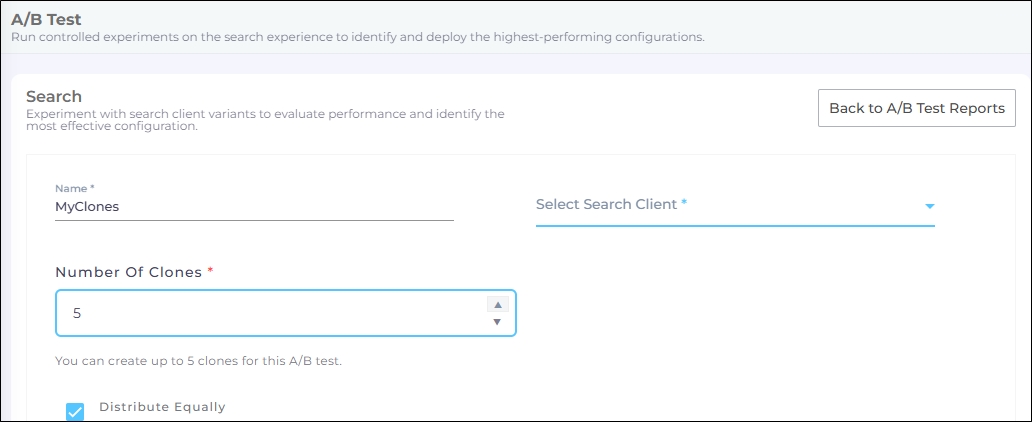
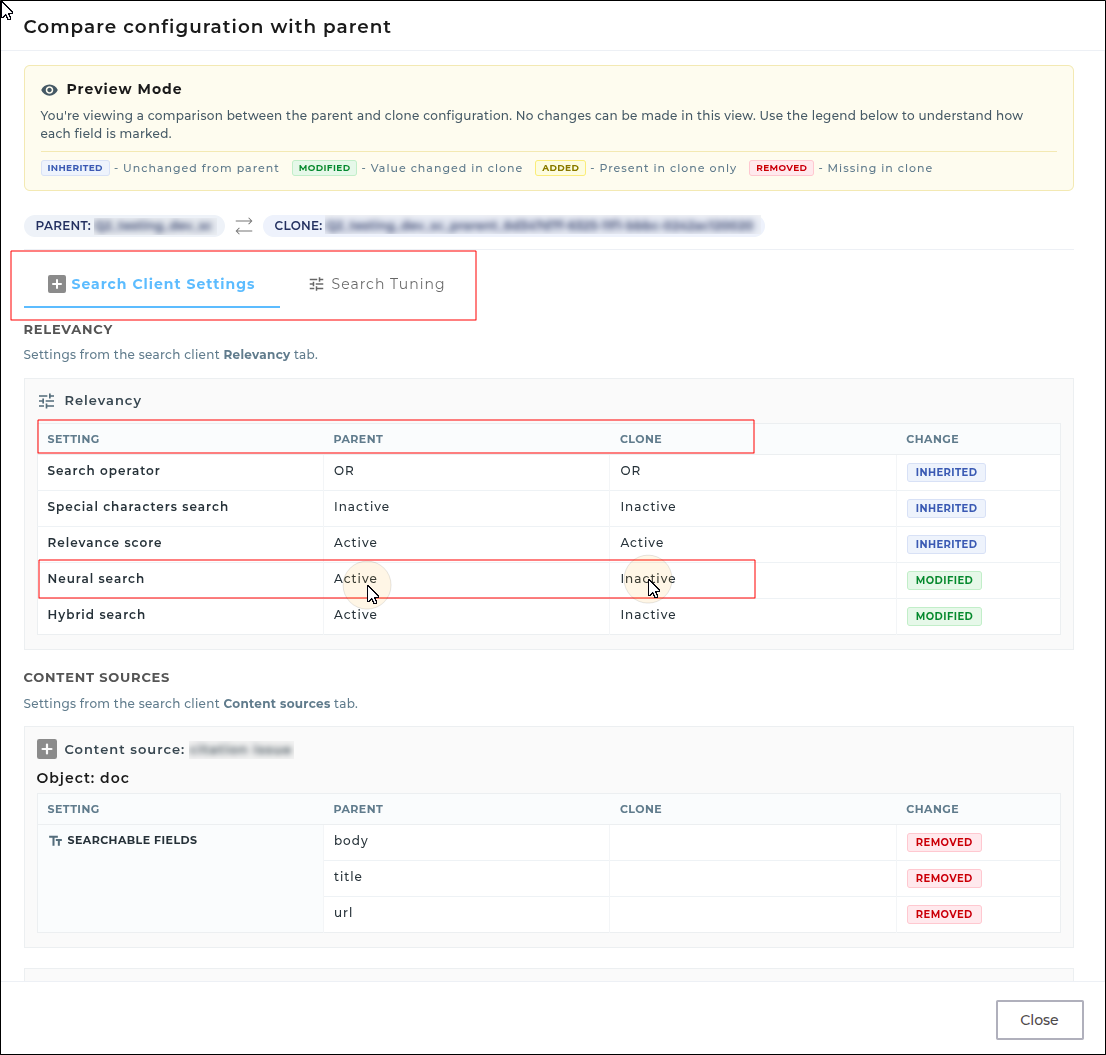
Another enhancement is that you can run A/B Testing on all the features that are in Search Clients > Edit > Content Sources, Search Clients > Edit > Relevancy, and Search Tuning. You can get to those settings by clicking the Edit button on a sub-search-client. The configurations for Content Sources and Relevancy are available in Search Client Settings. To configure tuning, click Search Tuning. Under these tabs you can view the settings of the parent and the cloned search client. In the next image you can see that Neural Search is Active for the Parent search client but Inactive for the Cloned search client.
Admin Logs for Content Annotation Actions
SearchUnify now provides detailed audit logs for Content Annotation. Whenever an annotation is created, edited, or deleted, the system records the annotation name, action type, user, and timestamp in Administration > Security > Admin Logs. This enhancement improves transparency, makes troubleshooting faster, and helps support teams investigate annotation-related changes with less manual effort.
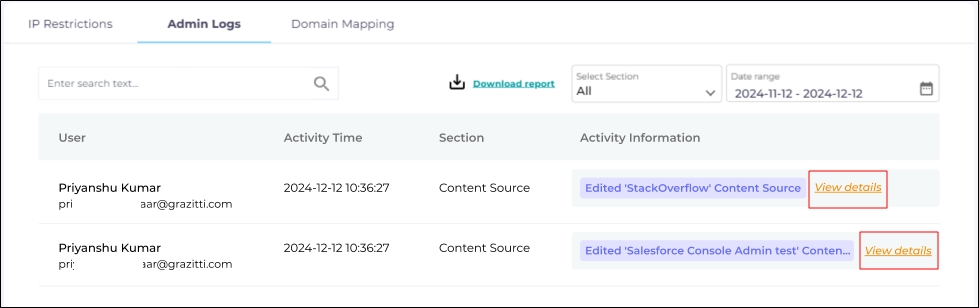
Fig. A snapshot of the Admin Logs for changes in the Content Sources tab.
More information: Admin Logs for Content Source
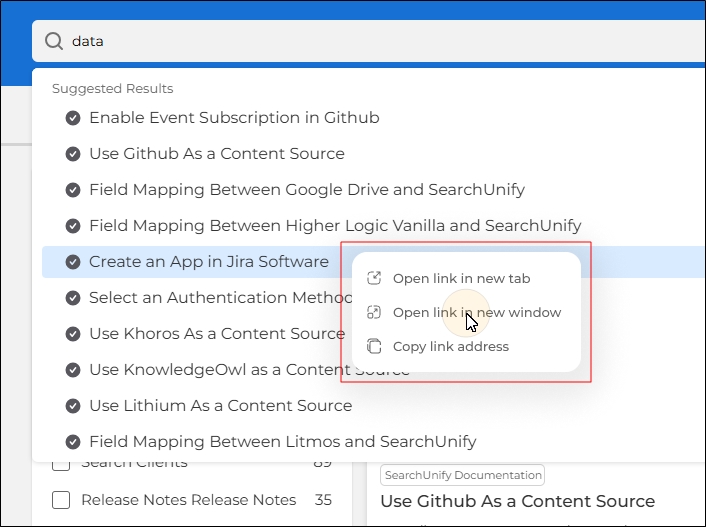
Custom Right-Click Menu Introduced on Recommendations and Suggestions
A menu that appears when you click the right button on a noun was introduced for search results in the Q4 ’25 release. That menu offered six options.
Now, the same menu with three options has been introduced for:
-
Recommendation Articles
-
SU GPT Citation Links
-
Suggested Results
The change provides a consistent user experience, proper analytics tracking, and standardized behavior.
Agent Helper
Dual Response Generation in Response Assist
Agent Helper now supports dual AI response generation in Response Assist. For every case query, support agents can simultaneously generate:
-
A customer-ready reply (Reply to Customer) – Polished for clear, courteous external communication with end users. The Set your tonality and multi-language support will continue to work as earlier for these replies.
-
An internal solution (Solution for Agent) – Intended for internal use, this version focuses on the technical aspects of the case, including troubleshooting details, resolution steps, and relevant references. It does not support tone customization or multilingual output since it’s designed strictly for internal communication.
This enhancement enables agents to create both customer-facing and internal responses in one step, streamlining communication and improving consistency across channels.

Fig: Snapshot showing the new segmented Response Assist view: 1) Reply to Customer and 2) Solution for Agent
More Information: Agent Helper Actions
Toggle Between Search and Agent Helper in the Same Widget (Salesforce Only)
Agents can now seamlessly switch between the Search view and Agent Helper using a labeled button in the top-right corner of the compact widget header. In the Search view, the button appears as Switch to Agent Helper, and in Agent Helper, it changes to Switch to Search. This feature currently works only in Salesforce.
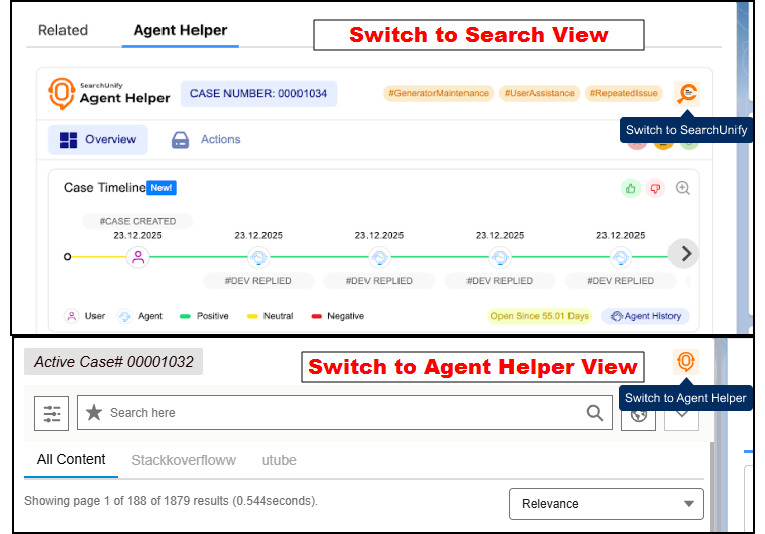
Fig: Snapshot showing the new switch view for Agent Helper and Search
The switch happens within the same compact widget, preserving both the current search state and the active case context so agents do not lose their place.
New: LLM-Powered Result Filtering
A new LLM-driven engine analyzes case context, including the subject, description, and history, to evaluate search results. It filters out keyword-matched noise and surfaces only documents that are likely to help resolve the case.
The new update automatically excludes partially relevant results to reduce agent cognitive load while providing admins the flexibility to manage and fine-tune the filtering prompt from the SearchUnify Admin panel. The filtered list and case summaries evolve in real time as the case progresses.
Improved search relevance through multi‑query execution with rephrased queries and aggregation support
SearchUnify now executes multiple–one, two, or three, based on configuration–rephrased variants of a search query, and then combines the results to deliver a more relevant and diverse set of documents. Each rephrased query fetches up to 10 results. The system merges them into a single list and sorts them by relevance score in descending order. When multiple results have the same relevance score, their order is randomized to avoid static ranking bias.
The feature supports optional aggregations in search requests. Aggregations do not affect result ranking, but they are returned in the response for analytics or UI use. Admins can configure the number of rephrased queries to execute and whether aggregations are included. The configurations allow greater control over result quality and performance. Logging captures which queries were run, how many results each returned, and the errors found during execution, making monitoring and troubleshooting easier.
Note: This enhancement currently works only with Agent Helper. For Search, this will be introduced in the next month.
Other Updates
-
Search queries inside double quotes are now treated as one long string. Previously, search clients could split such queries if they contained a non-alphabetic character (for example, a hyphen). Now “search-client” is treated as a single query rather than “search” and “client.”